
Design Stripe Checkout – Frontend System Design
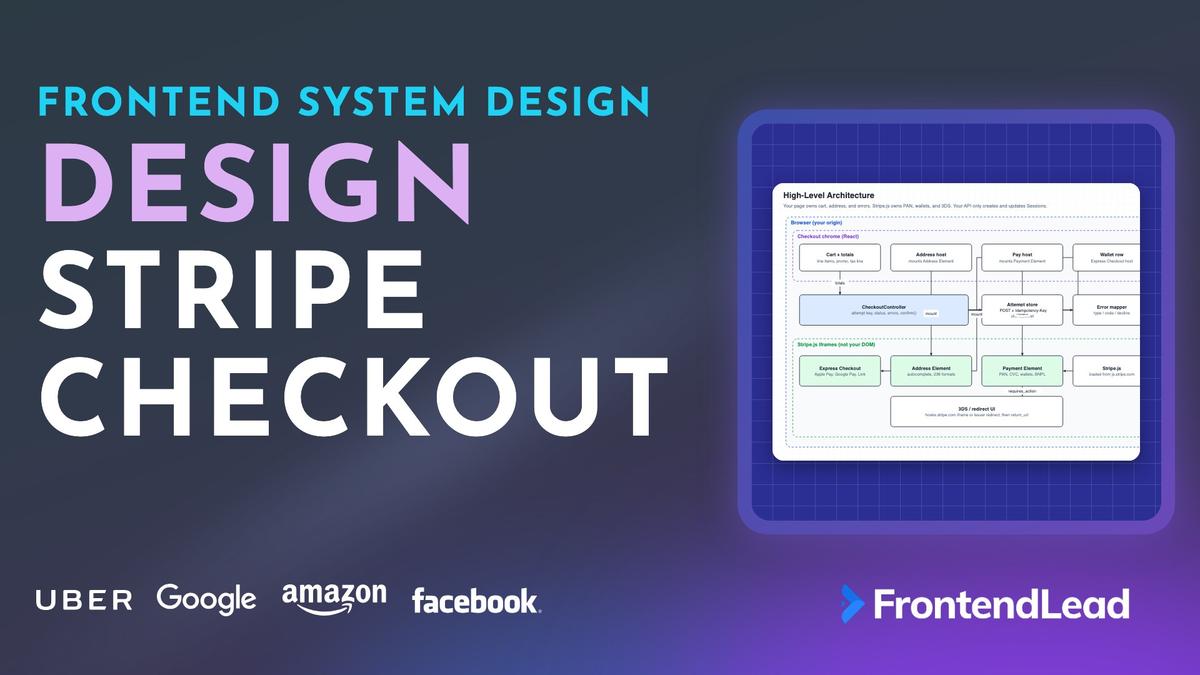
We’ll walk through the frontend system design for Stripe Checkout: a PCI-safe pay page that never sees a card number, that survives a double-click, that comes back from a 3DS redirect with the right status, and that still looks like your product. You’ll see when to redirect to a Stripe-hosted page, when to embed Checkout, when to own the layout with the Payment Element, and why a green success URL is not a receipt.
This is not “put a card form in React.” A custom <input> for the PAN is how you leave SAQ A. The interviewer is checking whether you can pick an integration surface, keep card data off your origin, and describe the PaymentIntent state machine without designing Stripe’s ledger.
Problem Statement
Design the frontend for a checkout that charges cards, wallets, and local payment methods through Stripe.
Requirements:
- Customers pay for a cart of line items, with tax and a shipping address
- Card numbers never touch your DOM, logs, or servers
- Apple Pay, Google Pay, and Link appear when the device can offer them
- SCA / 3DS challenges complete and return to your site
- A double-click or a retry does not create a second charge
- Declines, expired Sessions, and unexpected Intent states map to copy a human can act on
Describe the client architecture, the Stripe objects you hold, the confirm and redirect flow, and what the success page is allowed to do.
Interviewers are checking three things. Do you know the difference between hosted Checkout, embedded Checkout, and the Payment Element? Can you explain a PaymentIntent’s statuses and a 3DS return without fulfilling from a query string? And do you treat PCI as a boundary, not a slogan?
Clarifying Questions
| # | Question | Interviewer’s Answer |
|---|---|---|
| 1 | One-time cart, or subscriptions too? | One-time payments. Mention SetupIntents if asked about save-for-later. |
| 2 | Must checkout stay on our domain? | Brand wants our header and cart. A hosted redirect is acceptable as a fallback. |
| 3 | Which payment methods? | Cards plus wallets. Local methods come from the Dashboard, not a hardcoded list. |
| 4 | Tax and shipping? | Yes. Stripe Tax, address autocomplete, shipping rates that change the total. |
| 5 | Who fulfills the order? | A backend you do not design. You only consume a status API and a webhook-backed order. |
| 6 | Mobile web and in-app browsers? | Yes. Safari on iPhone must show Apple Pay. Embedded webviews are a known sharp edge. |
Question 2 is the integration-surface decision. Question 3 forbids payment_method_types: ['card']. Question 5 keeps this a frontend design: you do not invent Stripe’s capture pipeline or the merchant ledger. Question 6 matters for wallets and for 3DS redirects that bounce through an in-app browser.
Requirements
Functional
- Show line items, currency, tax, and a payable total that updates when the address or promo changes.
- Collect a shipping (or billing) address with autocomplete. Do not invent a country-format library.
- Offer Apple Pay, Google Pay, and Link when they are available; hide the wallet row when they are not.
- Collect cards and other methods through Stripe-hosted fields. Never render a PAN input on your origin.
- Confirm the payment, handle 3DS or a bank redirect, and land on a return page that shows status.
- Disable Pay while a confirm is in flight. Retry with the same idempotency key.
- Map Stripe errors to short, safe messages. Offer a new method after a decline without creating a new Intent unless the old one is terminal.
Non-Functional
- PCI SAQ A: PAN, CVC, and magnetic data never enter your JavaScript heap,
localStorage, analytics, or screenshots of logs. - HTTPS everywhere. Stripe.js loaded only from
js.stripe.com, never from your bundle. - A Pay click to a non-3DS success in well under two seconds of your own main-thread work. The issuer challenge is out of your budget.
- Sessions expire (default 24 hours, minimum about 30 minutes). The UI must not confirm an expired client secret.
- The success or return URL never ships goods. Fulfillment waits on a signed webhook that your backend already verifies.
SAQ A is the requirement that shapes the design. It forces iframes you do not style as native inputs, a script you do not self-host, and a confirm call you do not replace with fetch('/charge', { body: cardNumber }).
Napkin Math
| Metric | Estimate | Calculation | So what? |
|---|---|---|---|
| Session lifetime | 24 h default | Stripe expires the Session; min expires_at is ~30 min |
Persist client_secret in sessionStorage, not forever in localStorage. |
| Double-click window | 200–400 ms | Two submits before React disables the button | Idempotency key must exist before the first POST, not after. |
| 3DS drop-off | Noticeable | Extra redirect or challenge iframe | Wallets often skip 3DS. Show them first. Warn before a surprise redirect. |
| Wallet vs typed card | Seconds vs tens of seconds | Biometric sheet vs 16 digits + address | Express Checkout Element is not decoration. It is conversion. |
| Tax after ZIP | One update | Address complete → Session update → new amount_total |
Do not confirm until the total on screen matches the Session. |
| Safe card data | last4 + brand + exp | Stripe returns these; they are not PAN | You may store them. You may not store the number that produced them. |
Architecture

Pick the integration surface first. Stripe’s current recommendation is a Checkout Session for on-session payments. The PaymentIntent is still the payment state machine underneath, and it is the object you reason about when 3DS fires. You do not design how Stripe stores that Intent. You design which UI owns the customer and which secret the browser is allowed to hold.
| Surface | What the browser does | What you gain | What you give up |
|---|---|---|---|
| Hosted Checkout | POST a Session, redirect to session.url |
Stripe owns page, 3DS, wallets, tax UI, PCI | Your header, your cart layout, your pixels on the pay form |
| Embedded Checkout | Mount with client_secret via initEmbeddedCheckout |
Stays on your domain, still Stripe’s full page inside an iframe | Limited layout. Recovery links reopen hosted, not your embed |
| Custom (Payment Element) | Mount Elements, call confirm yourself | Your layout, Address Element, Express Checkout, Appearance API | You own totals, error mapping, return_url, expired secrets |
Hosted is the default senior answer when brand is not the constraint. The interviewer said the brand wants your chrome, so the design below is custom Elements on a Checkout Session (ui_mode that returns a client_secret, not a redirect URL), with hosted as the fallback for expired embeds and for recovery emails.
A raw PaymentIntent plus Payment Element is the older custom path. Use it when you must own tax, discounts, and shipping math yourself. Prefer a Checkout Session so Stripe Tax, line items, and Adaptive Pricing stay on the Session. Either way the browser talks to Stripe.js, not to api.stripe.com with a secret key.
| Layer | Owns | Runs | Talks to |
|---|---|---|---|
| Checkout chrome | Cart, Pay button, order summary | React, your origin | Controller only |
| CheckoutController | Attempt key, Session id, status, commands | Client singleton | BFF, Stripe.js |
| Stripe.js Elements | PAN, wallets, address, 3DS UI | Iframes from js.stripe.com |
Stripe, issuer |
| Checkout BFF | Create/update Session, order read model | Your server | Stripe secret/restricted key |
“React renders the cart and a Pay button. The card fields are a Stripe iframe. The PaymentIntent status is the only payment state I trust in the client, and I still do not fulfill until the backend says the webhook landed.”
If someone proposes the legacy Card Element, migrate to the Payment Element. If someone proposes createToken or the Charges API, say no. Confirmation Tokens exist for the deferred-intent case where you must inspect a method before confirm. You do not need them for a normal on-session cart.
Data Model

The client stores a cart you own, a view of the Checkout Session, and the PaymentIntent status. It never stores a card number. Money is integer minor units (4900 for $49.00), same rule as any serious money UI.
type Money = number; // minor units, integer only
type IntentStatus =
  | "requires_payment_method"
  | "requires_confirmation"
  | "requires_action"
  | "processing"
  | "requires_capture"
  | "succeeded"
  | "canceled";

interface CheckoutSessionView {
  readonly id: `cs_${string}`;
  readonly clientSecret?: string;     // embedded + custom
  readonly url?: string;              // hosted redirect
  readonly status: "open" | "complete" | "expired";
  readonly amountTotal: Money;
  readonly amountTax: Money;
  readonly expiresAt: number;         // epoch ms
}

interface Attempt {
  readonly idempotencyKey: string;    // minted once per cart snapshot
  readonly cartSnapshotHash: string;
  readonly sessionId: CheckoutSessionView["id"];
  readonly clientSecret?: string;
}

interface CheckoutError {
  readonly type: "card" | "validation" | "api" | "state";
  readonly code: string;
  readonly declineCode?: string;
  readonly safeMessage: string;
}
Three choices are worth defending.
The attempt is keyed by cart snapshot, not by user. Quantity plus 1 is a new amount, so it is a new key (or a Session update, then a new confirm). A refresh mid-3DS must reuse the same Session and the same client_secret. That pair lives in sessionStorage under the snapshot hash.
The client holds status, not capability. succeeded on a retrieved Intent is permission to show a receipt UI. It is not permission to call your fulfillment endpoint as if you were Stripe.
last4 is allowed; PAN is not. Brand, last four, and expiry are out of PCI scope. Log those. If a teammate logs elements or a raw change event “just in case,” you have a PCI incident, not a debug session.
Hosted vs Embedded vs Payment Element
Hosted Checkout is a redirect. Your BFF creates a Session with success_url and cancel_url. You send the browser to session.url. Stripe collects address, tax, wallets, and cards. 3DS happens on Stripe’s origin. The customer comes back to success_url with {CHECKOUT_SESSION_ID} substituted. That page looks up the Session for display. It does not mark the order paid.
Embedded Checkout keeps the customer on your URL. The Session is created with the embedded UI mode and you mount it with the Session client_secret:
The client side is three steps: load Stripe.js with the publishable key, initialize embedded Checkout with the Session’s client_secret, and mount it into an empty container on your page. The container is the only DOM you own. Everything inside it is Stripe’s iframe.
You pass a return_url for redirect-based methods. There is no success_url in the hosted sense. onComplete tells you the iframe finished. Treat it like the hosted success page: show a spinner, then poll your order API.
Custom Checkout is three Elements from one Stripe.js instance: Express Checkout, Address, Payment. With a Checkout Session you initialize Checkout with the Session client_secret and confirm through Checkout actions. With a PaymentIntent you call stripe.elements({ clientSecret }), elements.create('payment'), and stripe.confirmPayment. Same PCI story. Different confirm helper.
Omit payment_method_types on Session and Intent create. Dynamic payment methods pick what to show from the Dashboard, currency, and the customer. To hide a method, use a Payment Method Configuration or excluded_payment_method_types, not a hardcoded ['card'] array. That one line is how candidates silently kill wallets and local methods.
PCI: Never Touch the PAN

PCI-DSS applies to anyone who stores, processes, or transmits cardholder data. Stripe is a Level 1 service provider. Your job is to stay on the easiest merchant questionnaire, SAQ A, by never seeing the PAN.
- Card fields live in a Stripe iframe. Your page has an empty
<div id="payment-element">. - Stripe.js is loaded from
https://js.stripe.com(the@stripe/stripe-jsloader does this). A copiedstripe.jsin your Webpack graph is a PCI finding. - The publishable key (
pk_) is public. The secret or restricted key (sk_/rk_) never ships to the client. - HTTPS and TLS 1.2+ on the pay page. Mixed content is a hard fail.
- You may persist brand, last4, and expiry. You may not persist the number, CVC, or a screenshot of a filled iframe.
A custom styled <input name="cardNumber"> is the classic fail. It puts the PAN on your origin. You leave SAQ A and inherit the full card-data control set. The Payment Element’s Appearance API is how you match brand colors without taking the bytes.
Content-Security-Policy has to allow Stripe. For Elements: script-src and frame-src for https://js.stripe.com and https://*.js.stripe.com, connect-src for https://api.stripe.com and https://maps.googleapis.com, and frame-src https://hooks.stripe.com for 3DS and redirects. Hosted Checkout also needs https://checkout.stripe.com. Link adds https://*.link.com. Cross-origin isolation (Cross-Origin-Opener-Policy: same-origin plus COEP) is not supported by Stripe’s frames. Do not turn it on for the pay page.
Idempotent Attempts
Stripe de-duplicates creates when your server sends Idempotency-Key. The frontend’s job is to mint that key once per attempt and refuse to mint a second one for the same cart snapshot.
The attempt key lives in sessionStorage under checkout-attempt:<cartHash>. Reading it returns the existing key for that cart snapshot, or mints a crypto.randomUUID(), stores it, and returns it. The checkout client sends it as Idempotency-Key on POST /api/checkout/sessions with the cart id, and maps any non-2xx response to the typed CheckoutError. Two properties fall out of keying by cart hash: a refresh or a retry reuses the key, and a changed cart gets a new one automatically.
Disable Pay synchronously on the first click, before the await. The key is created when the user enters the pay step, not inside the click handler after a network round trip. A changed cart hash (quantity, SKU, promo) starts a new attempt. Updating an open Session’s line items is better than creating a second Session if the customer is still on the page.
If the first POST times out, retry with the same key. Stripe returns the original Session. Creating a new key is how you get two Intents and a double charge when the first one later succeeds.
Confirm, 3DS, and SCA


A PaymentIntent is created in requires_payment_method. Most Elements integrations attach the method and confirm in one step, so you barely see requires_confirmation. If the issuer or a Radar rule wants Strong Customer Authentication, status becomes requires_action. After a successful challenge the Intent moves to processing or succeeded. A decline returns it to requires_payment_method so the customer can try another card on the same Intent. canceled and succeeded are terminal. Confirming a terminal Intent yields payment_intent_unexpected_state.
On the PaymentIntent path:
The pay button calls stripe.confirmPayment with the Elements group, a return_url on your origin, and redirect: "if_required". Two outcomes come back to the page:
- An error object. Run it through the error mapper and show the safe message inline. The Intent is still usable.
- No error. Retrieve the PaymentIntent with the client secret and render its status. That is display, not fulfillment.
redirect: "if_required" keeps the customer on-page when Stripe can run the challenge in a hooks.stripe.com iframe (use Stripe SDK). Redirect-based methods (some 3DS flows, many bank methods) leave your origin. Stripe appends payment_intent and payment_intent_client_secret to return_url. The return page calls retrievePaymentIntent and renders. It does not POST “mark paid.”
On the Checkout Session Elements path you confirm through Checkout actions (checkout.confirm() / actions.confirm()) instead of confirmPayment. The lifecycle is the same: requires action, redirect or iframe, return, retrieve, wait for your order read model.
Wallets usually satisfy SCA with the device biometric, so they skip the extra 3DS page. That is one reason they sit above the Payment Element. Test the card path with Stripe’s regulatory test cards so a 4000000000003220-style 3DS success and a failed authentication both have UI.
Off-session charges (a saved card, a subscription renewal) are not this page. Mention SetupIntents and setup_future_usage if the interviewer asks how the first on-session pay enables later MITs. Do not pretend the pay button handles off-session 3DS.
Wallets
The Express Checkout Element is the current wallet row. The Payment Request Button is deprecated. Mount Express Checkout on HTTPS only. Register every apex and subdomain in the Dashboard payment-method domains list, live and sandbox. Apple Pay inside an iframe needs allow="payment" and, on older Safari, a matching parent origin.
Create the Express Checkout Element from the same Elements instance as the Payment Element, with emailRequired: true, and mount it above the card form. Two events matter. availablepaymentmethodschange hides the whole wallet row when the list is empty. confirm runs the same confirmPayment call as the pay button, with the same return URL and the same error mapping, so wallets and cards share one success and failure path.
emailRequired: true matters because Apple Pay and Google Pay do not give you an email unless you ask. Without it you cannot send a receipt or look up a customer.
Listen for shippingaddresschange and shippingratechange if you sell physical goods. Browsers may redact the street until confirm; you still get enough to price shipping. Call resolve or reject on those events. On cancel, reset the total to the pre-wallet amount.
You cannot force Apple Pay onto a Windows laptop. You can set a wallet to always so the button shows even when no card is provisioned, which is useful for discovery. Hide the whole row when availablepaymentmethodschange reports nothing, or you ship an empty grey strip.
Link belongs in both Express Checkout and the Payment Element. A returning Link customer autofills address and card. Create every Element from the same Elements (or Checkout) instance or autofill will not wire up.
Address Autocomplete and Tax
The Address Element supports 236 regional formats and autocomplete for a long list of countries (US, GB, DE, FR, IN, JP, and others). In shipping mode it can also copy into billing. Mount it from the same Elements group as the Payment Element and Stripe uses its own Google Maps key for autocomplete. If you mount Address alone, you pass your own Maps Places key.
Tax is not a frontend formula. Enable automatic_tax: { enabled: true } on the Checkout Session, give each line a tax_code and a tax_behavior (exclusive vs inclusive), and collect an address Stripe Tax can use. For many digital carts, Payment Element plus billing_address_collection: 'auto' collects country and postal code. For places where ZIP-level tax differs from street-level tax, collect a full address with the Address Element.
When the address change event reports complete, update the Session and redraw amount_total and total_details.amount_tax. Confirming while the on-screen total still says $49 and the Session now says $53.31 is how you get a surprised customer and a dispute. Inclusive vs exclusive is a display rule: exclusive adds a tax line; inclusive does not invent a second number.
Business VAT numbers go through the Tax ID Element, not a free-text field you validate with a regex you found on Stack Overflow. Real-time verification exists for some IDs (EU VAT, GB VAT, ABN) and reports pending | verified | unverified | unavailable on the change event.
Error Mapping
Stripe.js errors have type, code, and sometimes decline_code. The user sees one sentence. Logs see the codes. Never interpolate the raw message if it might echo issuer text you do not control, and never log the Element value.
| Signal | Typical cause | UI |
|---|---|---|
validation_error |
Incomplete Element, bad postal code | Inline, next to the iframe. Do not toast. |
card_declined / generic_decline |
Issuer said no | Try another method. Same Intent. |
insufficient_funds |
Decline code | Name it. Offer another card or a wallet. |
expired_card, incorrect_cvc |
Typed wrong | Stay on the form. Do not reset the cart. |
payment_intent_authentication_failure |
3DS failed or abandoned | Offer retry. Do not create a new Session yet. |
payment_intent_unexpected_state |
Already succeeded, canceled, or processing | Retrieve. Reconcile. Never confirm again blindly. |
idempotency_error |
Same key, different body | Your snapshot hash drifted. New key or fix the payload. |
The error mapper is a pure function from a Stripe.js error to the CheckoutError type in the data model. It prefers decline_code over code, because the decline code is more specific (insufficient_funds rather than card_declined). It looks that code up in a fixed table of human sentences that match the table above. It classifies type as card, validation, or api. Unknown codes fall back to “We could not complete the payment. Try another method.” The raw codes go to logs. Only the safe message reaches the screen.
After a decline the Intent is reusable. Creating a second Session because the first card failed is how a flaky retry charges both cards. After unexpected_state, retrievePaymentIntent (or retrieve the Session) and branch on succeeded / processing / canceled / still open.
Success URL vs Client Secret Lifecycle
This is the section that separates a senior answer from “then we redirect to /thanks.”
Hosted success_url is a landing page. Anyone can type it. Stripe substitutes {CHECKOUT_SESSION_ID} so you can retrieve the Session and render a receipt shape. Payment may still be processing for async methods. Fulfillment is checkout.session.completed and payment_intent.succeeded, verified with the webhook signing secret on the server you are not designing.
Embedded return_url and onComplete are the same landing, in-place. Poll GET /api/orders/:id until your read model says paid, failed, or still processing. Show a pending state for bank debits.
The client_secret initializes Elements or embedded Checkout and authorizes retrieve and confirm. It is not a receipt. It is a capability. Anyone who has it can attempt confirm on an open Intent. Put it in sessionStorage for the 3DS round trip, not in a long-lived cookie, not in your analytics identify payload, not in the URL you copy into Slack. Stripe putting it on return_url is their protocol; you still do not log the query string.
A Session expires. After expires_at, mount and confirm fail. Create a new Session with a new attempt key, copy the cart, tell the customer the pay session timed out. Abandoned-cart recovery, if you use it, mints a new Session from the expired one. For an embedded Session that recovery URL is hosted, not your iframe.
The return page algorithm is short:
- Read
payment_intent_client_secretor your stored secret. - Retrieve the Intent or Session. Map status to UI.
- If
succeededorprocessing, start polling the order. Stop when the backend confirms the webhook. - If
requires_payment_method, send them back to the form with the mapped error. - If missing or expired, start a new attempt. Do not confirm a ghost.
API
You do not design Stripe’s API. You design a thin BFF so the browser never sees rk_ or sk_.
// Browser -> your origin. Stripe secrets stay on the server.
POST /api/checkout/sessions
  headers: Idempotency-Key
  body: { cartId }
  -> 200 CheckoutSessionView          // clientSecret or url

POST /api/checkout/sessions/:id
  body: { address?, promoCode?, shippingRate? }
  -> 200 CheckoutSessionView          // new amountTotal / amountTax

GET  /api/checkout/sessions/:id       // display only, after return
GET  /api/orders/:id                  // { status: pending | paid | failed }
The BFF creates the Checkout Session (hosted, embedded, or elements UI mode), forwards the idempotency key, enables automatic_tax if you collect tax, and never accepts a PAN field. Order status flips only from a verified webhook. The frontend may not have a “fulfill” route.
Optimizations
| Problem | Technique | Effect |
|---|---|---|
| Slow first Pay click | Prefetch Stripe.js on cart view, create Session when totals stabilize | Confirm does not wait on script + POST |
| Empty wallet row | availablepaymentmethodschange, hide until methods exist |
No blank strip, no layout jump |
| Tax flicker | Debounce address complete, disable Pay until Session matches UI | Confirm amount equals what they saw |
| 3DS surprise | Wallets first; copy that a bank check may open | Fewer abandoned challenges |
| Self-hosted Stripe.js | Loader from js.stripe.com only | Stay on SAQ A |
| Re-creating Sessions | Attempt key in sessionStorage | Refresh and retry reuse one Intent |
Load Stripe.js when the cart is non-empty, not on every marketing page. The pay route should not be the first time the browser meets js.stripe.com.
Handling Edge Cases
- Expired Session. Retrieve fails or status is
expired. New attempt, same cart, new key. Explain the timeout. - Tab duplicate. Two tabs share
sessionStorageper tab, not across tabs. Use aBroadcastChannelor accept that a second tab mints a second attempt and cancel the older Session when the newer one is created. - In-app browsers. Instagram and some WebViews break Apple Pay and some 3DS redirects. Detect and offer hosted Checkout or “open in Safari/Chrome.”
- Back button after success. Return to a page that retrieves. If already
succeeded, show the receipt. Do not confirm again. - Promo after wallet sheet. Update the Session, then
resolvethe wallet event with new line items. Never confirm the old total. - India / regulated wallets. Apple Pay may not show. Do not treat a missing button as a mount bug.
- Processing that lasts days. Bank debits stay on a pending order UI. Do not auto-retry confirm.
- Ad blockers. Stripe.js blocked looks like a blank Payment Element. Detect a failed load and show hosted Checkout.
Accessibility and Security
Accessibility
- The Payment Element and Address Element ship their own labels and focus. Do not overlay invisible inputs.
- Pay is a real
<button>.aria-busy="true"while confirm is in flight. Disable it; do notpointer-events: noneon a<div>. - Errors go into an
aria-live="polite"region and into the field Stripe marks invalid. - Wallet buttons have issuer-controlled names. Do not relabel “Apple Pay” as “Quick pay.”
- Respect
prefers-reduced-motionon your own spinners. You cannot restyle the 3DS challenge.
Security
- PAN never in your DOM. That is PCI, and it is XSS blast-radius control.
- Allowlist
success_urlandreturn_urlon the server so checkout cannot be used as an open redirect. - Do not log
client_secret,Idempotency-Keypayloads that include secrets, or Element change events. - CSP as above. No
'unsafe-inline'just to mount Stripe; the official script src is enough. - Webhook verification is a backend concern, but the frontend must not grow a “trust the query string” shortcut that makes that verification optional.
What a Strong Answer Sounds Like
| Topic | Junior answer | Senior answer |
|---|---|---|
| Surface | “Use Stripe Checkout” | Hosted vs embedded vs Payment Element, and why Session beats a raw Intent for tax |
| PCI | “HTTPS and Stripe” | SAQ A, iframe-only PAN, js.stripe.com, last4 is safe, no self-hosted script |
| Idempotency | Disable the button | Key minted per cart snapshot, stored, reused on timeout; new key after amount change |
| 3DS | “Stripe handles it” | requires_action, return_url, retrieve on return, wallets often skip the extra step |
| Success | Redirect to /thanks and fulfill | Landing page + poll; webhook is the source of truth; client_secret is not a receipt |
For a broader look at money on the client, see Design a Budgeting App. For how a large app keeps secrets off the origin, see Frontend Security Best Practices.
Conclusion: How to Design Stripe Checkout
Start with the boundary. Your origin owns the cart, the attempt key, and the error copy. Stripe-hosted iframes own the PAN, the wallet sheets, and the 3DS challenge. Your BFF creates a Checkout Session with an idempotency key and never accepts a card field.
Then pick a surface. Hosted if brand does not matter. Embedded if you need your URL and can live inside Stripe’s page. Payment Element plus Express Checkout plus Address Element if you own the layout. Confirm through Stripe.js, retrieve after return_url, and treat success_url as a landing page. If you can explain why a second Pay click must reuse the same key and why redirect_status=succeeded is not fulfillment, you have answered the actual interview.