
Build ChatGPT – Frontend System Design Guide
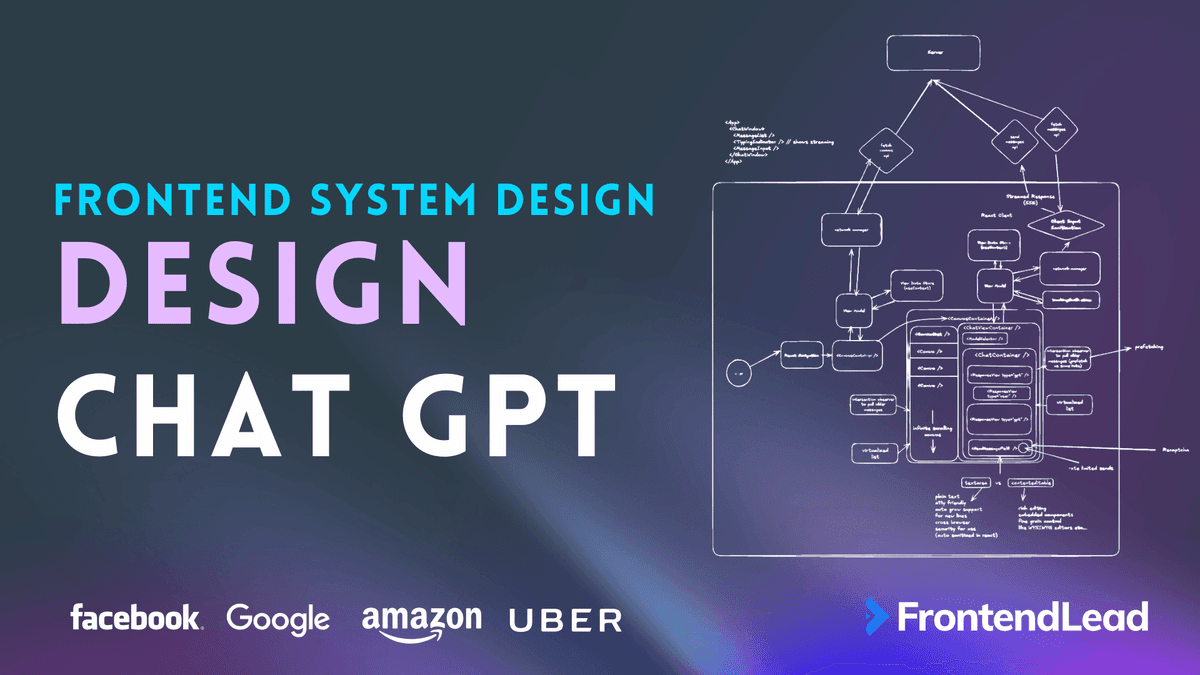
We’ll walk through the frontend system design for building a ChatGPT-style web application. Our goal is to design an interface that lets users enter prompts, stream responses word by word, maintains a conversation history, and optionally supports model switching (for example, toggling between GPT-3.5 and GPT-4). We’ll focus on building a frontend that’s fast, scalable, and production-ready, capable of serving millions of users with smooth, real-time experiences. You’ll see estimates for scale, functional requirements, and the key non-functional criteria that make for a robust, user-friendly AI chat app.
Requirements

- Prompt input: User enters a prompt.
- Streaming response: Chat response streams words word by word, similar to ChatGPT.
- Conversation history: Threads of past chats per user.
- Model switching (optional): Choose between GPT-3.5, GPT-4, etc.
Scalability Estimates
| Metric | Estimate | Calculation | Notes |
|---|---|---|---|
| Daily Active Users (DAUs) | 10M | 10 million users per day | |
| Conversations per User | 5 | 10M x 5 = 50M conversations/day | |
| Messages per Conversation | 4 | 50M x 4 = 200M messages/day | |
| Average Message Size | 100 bytes | 200M x 100 bytes = 20GB/day | ~7.3TB/year |
| Database Requirements | Scalable (NoSQL/Replica DBs) | – | Must handle read-heavy workloads, suggest using Redis for caching |
Non-Functional Requirements
- Real-time streaming (low latency)
- High availability
- Scalable backend
- Secure data handling
- Mobile-responsive UI
- Rate limiting or usage limits
- Fallback for slow networks/retry
- Performance
Frontend Architecture Overview

Let’s break down how to architect a robust, scalable frontend for ChatGPT. The goal is to create a web app that feels instant, smooth, and reliable—even under massive user load. We want users to feel like they’re chatting with an assistant in real-time, with instant feedback, seamless navigation, and a persistent conversation history. To deliver this, we combine modern React design patterns, real-time data streaming, and a focus on security and performance.
At a high level, the system follows a modular approach. Each core responsibility—such as message input, chat history, and response streaming—lives in its own React component, making the app easier to maintain and extend. Data flow is predictable and managed using a central state store, usually implemented with React Context, Redux, or Zustand. All data fetching and mutation routes go through a dedicated Network Manager module, which keeps side effects outside the view layer. Let’s dive into each area in detail.
Component Structure and Responsibilities
The frontend is made up of composable React components that each handle a specific part of the UI or workflow. Here’s a breakdown of the major components and their responsibilities:
- App: The root component. Handles top-level state, authentication, and initial data fetches. Renders child components for chat windows, navigation, and message input.
<App> <ChatWindow /> <MessageList /> <TypingIndicator /> <MessageInput /> <ChatWindows /> </App> - ChatWindow: Displays the active conversation, including both user and assistant messages. Manages infinite scroll for older messages and updates as new responses stream in.
- MessageList: A virtualized list of all messages in the current chat. Designed for efficiency, it only renders what’s visible on screen, allowing for fast scrolling, even with thousands of messages.
- TypingIndicator: Animates as the assistant types out each response. Connects to the real-time streaming logic, allowing users to see responses appear word by word.
- MessageInput: Where users type their prompts. Handles keyboard shortcuts, input sanitization, and triggers message sends.
- SendMessageBtn: The action button to submit a new prompt. Integrates reCAPTCHA or similar anti-abuse checks to prevent bots or spam.
- ConvosContainer: Allows users to view all their past conversations. Includes features like infinite scroll, search, and quick switching between threads.
Network Layer and Data Management
A Network Manager manages all API requests and streaming connections. This module abstracts away the details of HTTP requests and Server-Sent Events (SSE), so the rest of the app doesn’t have to worry about transport logic. It also centralizes error handling, retries, and analytics tracking, ensuring a consistent user experience.
- Network Manager: Handles:
- Fetching conversation lists and message history
- Sending user prompts to the backend
- Receiving streamed responses from the server
- Managing auth headers and API tokens
- Tracking performance, errors, and user analytics
State management is handled through a central store, using either React Context, Redux, or Zustand. This global state holds conversation threads, user metadata, loading and error states, and UI preferences. It enables any component to react to updates and keeps the UI in sync with the backend.
Streaming Response Workflow
A standout feature of ChatGPT is its real-time response streaming. Instead of waiting for a full reply, users see each word or token appear as soon as the backend model generates it. This is usually implemented with Server-Sent Events (SSE) or WebSockets.
- The user enters a prompt in MessageInput and clicks send.
- Network Manager sends the prompt to the backend.
- The backend starts generating the response and pushes each token as it becomes available.
- The frontend listens to the SSE stream, updating the MessageList in real-time as each new word arrives.
- If the user switches threads or navigates away, the stream is paused or cancelled to save resources.
This approach feels much faster to users and mirrors a real conversation. It also requires careful handling of partial messages, error states, and UI updates.
Conversation History and Virtualization
Users expect their conversation history to be instantly available, even across thousands of chats. The frontend stores a list of recent threads, including metadata such as timestamps and model version. When a user opens a thread, the app fetches only a window of messages, loading older messages on demand with infinite scroll. This keeps the initial page load light and fast, even for power users.
- Recent chats are shown using a ConvosContainer component, often with search and filter options.
- Each chat is displayed in a ChatWindow, utilizing a virtualized MessageList to render large numbers of messages efficiently.
- Intersection observers detect when to load more messages or prefetch upcoming ones.
State and Data Flow
A predictable data flow is crucial for reliability and maintainability. Here’s a typical flow:
- User action triggers a state update (e.g., sending a prompt or switching threads).
- Network requests are fired through the Network Manager.
- Response streams are received and update the global store.
- UI components subscribe to store changes and update reactively.
- All errors and loading states are surfaced in the UI so the user always knows what’s happening.
This separation of concerns makes debugging easier and ensures that all network or side-effect logic stays out of the UI components.
Performance, Prefetching, and Caching
With high user volume and chatty interfaces, performance matters. Several strategies keep the app fast:
- Virtualized lists: Both message lists and chat lists only render what’s visible. This keeps scrolling smoothly, even with thousands of messages.
- Prefetching: When a user hovers over or opens a conversation, the app preloads data in the background to enhance performance. This minimizes perceived latency.
- Intelligent caching: Frequently accessed data, like recent threads and user profiles, is cached in-memory or in local storage. Expiry policies and background refreshes ensure freshness without over-fetching.
- Bundle splitting and lazy loading: Load UI components and libraries only when needed. For example, advanced input editors or media handlers load on demand.
- Client-side error boundaries: Ensure that a crash in one component doesn’t take down the whole app. Surface-friendly error messages and allow users to recover.
Security and Input Sanitization
Security is built in from the start. All user inputs are sanitized before rendering to prevent cross-site scripting (XSS) attacks. Because chat content might include HTML, code, or links, the frontend escapes all potentially dangerous characters. In React, this is typically handled automatically, but extra checks are used for any raw HTML.
- Rate limiting: Prevents bots from spamming the chat endpoint. The SendMessageBtn disables rapidly after each send and re-enables after a short delay.
- reCAPTCHA integration: Used before sending the request to the backend to ensure it is human.
- Content sanitization: Every user message is cleaned before it’s sent and before it’s rendered.
Mobile Responsiveness and Accessibility
The frontend is designed to be mobile-first. All layouts are adaptable to different screen sizes, featuring touch-friendly controls and responsive type sizes. Keyboard navigation, ARIA labels, and screen reader support make the app accessible to everyone. Core functions, such as entering a prompt, navigating threads, and viewing message history, are fully operable with the keyboard alone.
- Accessible buttons and inputs: All interactive elements use proper roles and labels.
- Graceful error states: Users always get clear, actionable feedback if something goes wrong.
- Localizations: The app can support multiple languages and right-to-left layouts.
Extensible Input and Rich Content
ChatGPT isn’t just plain text. Users may want to send images, code blocks, or rich-formatted messages. The frontend supports two types of editors:
| Component | Purpose | Notes |
|---|---|---|
| Extranea | Handles plain text, supports emojis, auto-grows for multiline input, and is cross-browser compatible. Always sanitize input. | Safe by default. Used for basic chat UI. |
| ContentEditable | Enables rich content: code blocks, images, WYSIWYG editing, and custom embeds. | More complex, used for advanced or enterprise chat features. |
Data Flow Summary
The following steps summarize the complete frontend flow for a ChatGPT message exchange:
- The user opens the app and loads recent conversations. Only metadata is fetched initially.
- The user selects or starts a conversation. The relevant messages are fetched and displayed using a virtualized list.
- The user types a prompt and clicks send. The message is sanitized, rate-limited, and verified as human via reCAPTCHA.
- The prompt is sent to the backend using the Network Manager. The UI immediately shows a pending message with a typing indicator.
- The backend streams the response as tokens become available. The UI updates the chat window word by word, keeping the user engaged.
- If the connection fails, the frontend retries the request or shows an error with a retry button.
- Once complete, the message is saved to history, and the input field is reset for the following prompt.
Best Practices and Final Thoughts
- Keep components modular and responsibilities clear. Avoid tightly coupled logic.
- Always separate network effects from view logic using a dedicated manager or hooks.
- Prefer optimistic UI updates where possible for instant feedback.
- Utilize virtualization and prefetching to achieve scalable performance at any user scale.
- Invest early in accessibility and mobile-friendliness. It pays off as usage grows.
- Review all input and output handling for security and be proactive in sanitizing data.
Data Model

The data model needs to be simple, fast to query, and easy to extend. At minimum, we need to support conversation threads, messages, and basic user info. Messages must support streaming, threading, and system metadata.
Core Types
// Preview of a conversation in the list
type ConversationPreview = {
  id: string;
  title: string;
  updated_at: string;
};

// Full conversation details
type FullConversation = ConversationPreview & {
  model: string;           // e.g. "gpt-4"
  temperature: number;     // sampling parameter
  notes?: string;          // user notes (optional)
};

// Message object
type Message = {
  id: string;                   // unique identifier
  conversation_id: string;      // foreign key to Conversation
  user_id?: string;             // present for users
  ip_address?: string;          // for anonymous usage
  text: string;                 // message content
  gpt_response: boolean;        // true if generated by GPT
  parent_message_id?: string;   // for threaded replies
  created_at: string;           // ISO timestamp
  rating?: number;              // optional score (e.g. 1–5)
};
API Endpoints
GET /conversations– Returns a list ofConversationPreviewfor the user.GET /conversations/{id}/messages– Returns an array ofMessagefor a conversation.POST /conversations/{id}/messages– Adds a new message (user prompt).
Message Streaming Format
The backend streams message data as each token is generated. The frontend consumes these events in real time.
// Message event stream format
data: {
  "id": "...",
  "choices": [
    {
      "delta": {
        "content": "Hello "
      }
    }
  ]
}

data: {
  "choices": [
    {
      "delta": {
        "content": "world"
      }
    }
  ]
}

data: [DONE]
Notes
- Each message has an
idfor easy updates and threading. gpt_responseflags AI-generated vs user messages.parent_message_idSupports reply threads and future group chat features.- Streaming allows the UI to update as each chunk arrives.
[DONE]Signals completion.
API Design

The API should support standard CRUD operations for conversations and messages, as well as a real-time streaming endpoint for responses. For the chat streaming experience, using Server-Sent Events (SSE) is preferred. SSE allows the server to push each token or chunk as soon as it is ready, providing users with immediate feedback and a smoother user interface. Every API should use explicit, predictable request and response shapes. Authentication is handled via an auth token in the header.
Endpoints
| Action | Method & Endpoint | Description |
|---|---|---|
| Create Conversation | POST /v1/conversation | Create a new chat thread. Returns { id } for the new conversation. |
| Delete Conversation | DELETE /v1/conversation/{id} | Remove a chat thread for a user. Returns { success }. |
| View Conversations | GET /v1/conversations?cursor=…&limit=20 | List recent conversations (paginated). Returns array of ConversationPreview. |
| View Conversation with Messages | GET /v1/conversation/{id}/messages?cursor=…&limit=20 | Fetch a full conversation and its messages. Returns { conversation, messages, nextCursor }. |
| Send Message (Streaming) | POST /v1/conversation/{id}/message | Sends a user prompt and streams the response from the backend. Headers: authToken, Idempotency-Key, Accept: text/event-streamBody: { text, timestamp }Response: Each token/chunk streamed as an SSE event. Example stream: |
| Rate Message | POST /v1/conversation/{id}/message/rating | Send feedback or a rating for a message. Body: { score }. Returns { success }. |
Notes on Streaming with SSE
- For streaming chat responses, Server-Sent Events (SSE) is preferred over regular HTTP fetch. SSE allows the backend to send each chunk as soon as it’s ready, maintaining the strict order. The client receives and renders each piece immediately.
- All message events follow a simple, predictable JSON structure, allowing the frontend to update the chat view in real-time.
- Use an
Idempotency-Keyheader on message POSTs to prevent accidental duplicate sends. - When the backend is done streaming, it sends a
data: [DONE]signal to completion. - All endpoints require an
authTokenheader for security. - Pagination is handled via
cursorlimitParameters for listing messages and conversations.
Example: Consuming SSE on the Frontend

// Set up SSE connection
const eventSource = new EventSource('/api/conversation/stream');

eventSource.onmessage = (event) => {
  const parsed = JSON.parse(event.data);
  if (parsed.choices) {
    updateLastMessage(parsed.choices[0].delta.content);
  } else if (event.data === "[DONE]") {
    eventSource.close();
  }
};
SSE ensures each token is delivered in strict sequence over TCP. This keeps the chat experience smooth and in order. For browsers or environments that don’t support SSE, consider a fallback to fetch with ReadableStream for token-wise updates.
Streaming Optimizations

Smooth, real-time chat streaming is key for a great user experience. To keep the UI responsive and reduce unnecessary work, we need to optimize both the frontend and backend streaming pipelines.
Frontend Streaming Strategies
- Avoid React re-renders per token. Instead of updating React state every token, use a ref or
innerHTMLto append tokens directly. - Token buffering. Buffer 10–20 tokens, then update the DOM in one batch. This reduces rendering overhead, keeping scrolling smooth.
- Animation frame scheduling. Use
requestIdleCallbackorrequestAnimationFrameto schedule DOM updates for best performance. - Pause streaming in background tabs. Use
document.visibilityStateto detect when the tab is hidden and pause updates.
Sample Implementation

// In your chat container component
const [tokenBuffer, setTokenBuffer] = useState<string[]>([]);
const flushRef = useRef(false);

useEffect(() => {
  let animationFrameId: number;
  const flushTokens = () => {
    if (flushRef.current && tokenBuffer.length > 0) {
      const snapshot = [...tokenBuffer];
      setTokenBuffer([]); // clear buffer
      setRenderedMessage(prev => prev + snapshot.join(""));
      flushRef.current = false;
    }
    animationFrameId = requestAnimationFrame(flushTokens);
  };
  animationFrameId = requestAnimationFrame(flushTokens);
  return () => cancelAnimationFrame(animationFrameId);
}, [tokenBuffer]);

// In your SSE event listener:
eventSource.onmessage = (event) => {
  const newToken = event.data;
  flushRef.current = true;
  setTokenBuffer(prev => [...prev, newToken]);
};
Backend Streaming Optimization

- Chunked transfer encoding. For Express/Node.js, use
res.write()andres.flush()to stream tokens to the client as soon as they’re available. - Token batching. Group tokens together (for example, send every 50 milliseconds) to reduce I/O overhead.
- Backpressure control. Monitor the client’s buffer size. If the client is slow, pause token generation (for WebSocket) or skip writes.
Latency Minimization
- Edge functions. Use platforms like Vercel or Cloudflare Workers to reduce time-to-first-byte (TTFB).
- Stream-start optimizations. Start emitting tokens as soon as the first token is ready. If model latency is high, pre-fill the first token (using a fake-typing fallback).
Handling User Edge Cases
| Case | Strategy |
|---|---|
| ❌ User sends empty or spam input | Debounce and validate input. Reject if empty or too short. |
| ❌ User sends multiple chats fast | Use AbortController to cancel prior requests before starting new ones. |
| 🔄 User reloads tab | Persist the session in localStorage or the backend for seamless resumption. |
| 🔁 Retry/Regenerate | Save prompt/metadata in a queue to allow retrying or regenerating failed messages. |
| 📶 Network loss | Graceful SSE/WebSocket reconnection using Last-Event-ID or message ID to resume streaming without duplicates. |
| ⏳ Token expired | Prompt user to re-authenticate and retry the last request automatically. |
| 🚫 Abuse/spam | Add rate limits per IP address or user ID and block VPNs or proxies as needed. |
Bonus UX Enhancements
- Partial Markdown rendering: Highlight code blocks as they stream in.
- Smart autoscroll: Only scroll to the bottom if the user is already there, avoid interrupting mid-scroll.
- Typing placeholder: Show “GPT is typing…” animation for better user feedback.
Pro-Level Optimizations
| Area | Suggestion |
|---|---|
| Streaming Smoothness | Use requestAnimationFrame batching when appending many tokens to avoid layout thrashing. |
| Typing Indicator | Debounce display if the user types very fast. Hide onBlur or after a short timeout. |
| Retry Logic | On SSE disconnect, use the Last-Event-ID header to resume the stream without losing progress. |
| Client Memory | Clear out-of-view messages in the virtualized list. Optionally set a maxRenderCount for lower memory usage. |
| Analytics Hook | Add a hook on each token render or user interaction for tools like Mixpanel. |
| Mobile | Adjust the virtual list to prevent input field overlap when the mobile keyboard opens (a common issue). |
Conclusion: ChatGPT Frontend System Design
Building a modern ChatGPT frontend is all about creating a fast, scalable, and user-friendly chat experience. We broke down the key requirements, from core architecture and data modeling to API design, streaming strategies, and user edge case handling. Each decision—from using SSE for real-time streams to virtualizing message lists and optimizing for mobile—directly impacts how users experience the app at scale.
The best frontend systems anticipate real-world usage patterns. They gracefully handle network hiccups, edge cases, and high user volume. By focusing on efficient rendering, robust input validation, and smooth streaming, you ensure the UI feels responsive at all times. Pro-level details like animation batching, session persistence, and Markdown support add polish that users notice.
With this system design, you’re set up to deliver a ChatGPT frontend that feels modern, reliable, and ready for millions of users. Focus on simplicity, clarity, and performance, and you’ll build an experience that stands out in the AI chat landscape.