
Design Chat Application – Frontend System Design Guide

In this guide, we design a chat app’s frontend: real-time messaging over WebSockets, offline support, and infinite scrolling through message history.
Requirements
Functional
You provided the following main functional requirements:
- Real-time sending and receiving of messages across devices.
- Offline support: Messages sent offline should be stored and then sent when the user comes back online.
Clarifying Questions:
- Is there any authentication required for users?
- Assume users are authenticated.
- Do we need features like message read indicators, typing indicators, or group chats?
- If we have time at the end, right now, out of scope.
- What about media messages, like images, videos, or files?
- If we have time at the end, right now, out of scope.
- Is message history preserved indefinitely, or is there some sort of retention policy?
- We will leave that up to you to follow best practices.
- How should notifications be handled?
- Out of scope right now.
Non-Functional
- Observability: Given that every user might send or receive messages multiple times a day, and if there are thousands or even millions of users, the log volume can be substantial. Depending on the volume, logs can contribute significantly to the costs. Consider storing logs selectively or aggregating them. Monitoring and alerting should be in place for the chat system’s health and performance metrics.
- Devices: To be clarified. (Assuming web for desktop and mobile as well as native mobile apps for iOS and Android.)
- Demographics: Given that it’s a chat application, it’s safe to assume a global audience unless specified.
- Accessibility: The application should follow web accessibility standards like WCAG. Features like screen reader support, high contrast mode, keyboard accessibility, etc., should be integrated.
- Performance: Users expect real-time applications to be fast and responsive. Latency should be minimized, especially in message delivery.
High-Level Architecture Design
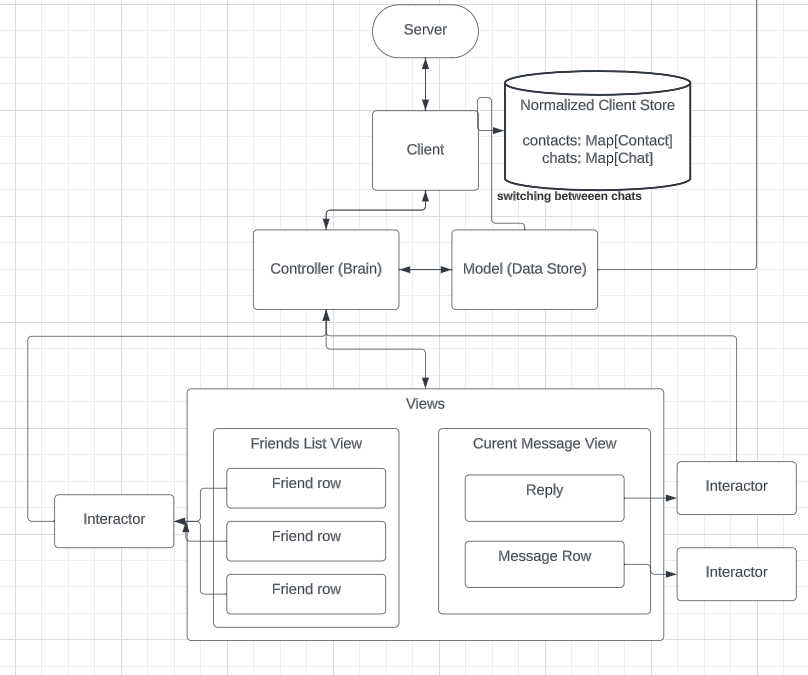
MVC Model
Model: Represents the data structures and the business logic.
- User Data: Includes user credentials, JWT tokens, and user profile data.
- Chat Data: Conversations and messages associated with each user.
View: Represents the UI of the application.
- Conversations Screen: List of ongoing conversations.
- Conversation Detail Screen: Detailed view of a single conversation with messages.
Controller: Manages the data flow into the model object and updates the view whenever data changes.
- Handles user input, server responses, and data persistence.
Communication with the Server
We’d primarily be using WebSockets for real-time bidirectional communication. WebSockets are chosen for instant message sending/receiving without the overhead of repeatedly establishing connections, which would be the case in HTTP long-polling.
Data Flow:
- User logs in, and after successful authentication, receives a JWT.
- The client establishes a WebSocket connection using the JWT for authentication.
- For offline messages, the client stores them locally. Once back online, the client sends these messages over the WebSocket.
- The server processes the incoming messages, persists them, and broadcasts to the intended recipient(s).
On the Conversations Screen, when a new message arrives, the respective conversation bubbles up. On the Conversation Detail Screen, new messages appear in real-time.
- A “User” box sends an “Authenticate” action to a “Server” box.
- The “Server” box responds with “JWT.”
- The “User” box initiates “WebSocket Connection” to the “Server” box, which is authenticated using the JWT.
- Bi-directional arrows represent ongoing “Message Exchange” between the “User” box and the “Server” box over the WebSocket.
Device Support
Given the requirements and the usual expectations for such applications:
- Web: Progressive Web Application (PWA) to support both desktop and mobile browsers. PWAs can also provide offline capabilities using service workers.
- Mobile: Native apps for iOS and Android. They provide better integration with device capabilities and can utilize local storage for offline message support.
The high-level architecture gives an overview of the structure and data flow of our chat application.
Handling Infinite Scrolling in our API
Offset-based Pagination:
- Uses a numeric offset to skip a fixed number of records.
- Can be inefficient for large datasets because databases might scan from the start of the table to the offset.
- In a real-time chat scenario, if new messages are inserted at the start (newer messages), the offset can skip or duplicate messages, leading to a poor user experience.
Cursor-based Pagination:
- Uses a “cursor” (often a unique ID or a timestamp) to navigate through records.
- More efficient for databases since they can jump directly to a record.
- Handles real-time data more gracefully. Even if new messages are added, using a unique ID or timestamp as a cursor ensures users won’t see duplicates or miss messages.
- Well-suited for frequently updated datasets, like real-time chat messages.
Given the advantages of cursor-based pagination, especially in the context of a real-time chat application, I’d recommend using it.
Intersection Observer vs Scroll Based
We should use Intersection Observer because the browser does the intersection checks off the main thread (callbacks still run on it), versus using window.scroll and having to debounce and customize it.
API Design
Given the real-time nature of the application, the primary communication will be over WebSockets. However, we’ll also need some HTTP-based endpoints for the initial setup, like authentication.
Protocol
- HTTP/HTTPS: For authentication and initial setup. HTTPS ensures encrypted and secure data transfer.
- WebSockets (over TLS for encryption,
wss): For real-time bidirectional communication between the client and server.
Authentication
To log a user in and receive a JWT.
Endpoint:
/api/auth/loginMethod:
POSTRequest:
{ "username": "exampleUser", "password": "examplePass" } Response:
{ "token": "jwtTokenStringHere", "user": { "id": "user123", "name": "Alice" } } Get Conversations
Retrieve a list of conversations for a user.
Endpoint:
/api/conversations?afterId=cnv123&limit=10
Method:
GETHeaders:
Authorization: Bearer jwtTokenStringHere Response:
{
    "conversations": [
        {
            "id": "conv1",
            "lastMessage": {
                "id": "msg567",
                "content": "How are you?",
                "timestamp": 1676543289
            },
            "participants": ["user123", "user456"]
        },
        // ... other conversations
    ]
}
Get Messages for a Conversation
Retrieve messages for a specific conversation.
Endpoint:
/api/conversations/:conversationId/messages?afterId=msg123&limit=10Method:
GETHeaders:
Authorization: Bearer jwtTokenStringHereResponse:
{
    "messages": [
        {
            "id": "msg124",
            "content": "Hey!",
            "senderId": "user456",
            "timestamp": 1676543290
        },
        // ... other messages
    ]
}
Send a Message
Send a message within a conversation.
Endpoint:
/api/conversations/:conversationId/messagesMethod:
POSTHeaders:
Authorization: Bearer jwtTokenStringHere Request:
{ "content": "Hi there!" } Response:
{
    "message": {
        "id": "msg789",
        "content": "Hi there!",
        "senderId": "user123",
        "timestamp": 1676543390
    }
}
Update Message Status (for offline handling)
When the client comes back online and wants to update the status of messages that were sent offline.
Endpoint: /api/messages/:messageId/status
Method: PUT
Headers:
Authorization: Bearer jwtTokenStringHere
Request:
{ "isSent": true } Response:
{
    "message": {
        "id": "msg789",
        "isSent": true
    }
}
Client Data Model
Data Types
interface User {
    id: string;
    name: string; // This can include other fields like avatar, status, etc.
}


interface Message {
    id: string;
    content: string;
    senderId: string; // Reference to User's ID
    timestamp: number; // POSIX timestamp for message time
    isSent: boolean;   // Indicates if the message was sent (useful for offline scenarios)
}


interface Conversation {
    id: string;
    lastMessageId: string; // ID of the last message in the conversation for easy retrieval and ordering
    participantIds: string[]; // IDs of the participants
}
Client Store
interface ClientStore {
    users: { [id: string]: User };               // Dictionary of users
    messages: { [id: string]: Message };        // Dictionary of messages
    conversations: { [id: string]: Conversation }; // Dictionary of conversations
    currentConversationId: string | null;       // The ID of the currently selected conversation
}
Explained:
users: A dictionary of all users the client knows about. Each user can be fetched using theirid.messages: All messages are stored in a dictionary. This makes it easy to fetch a specific message and also helps in ensuring each message is stored only once, even if it is referenced from more than one place.conversations: Conversations are stored in a dictionary as well. For each conversation, we store participant IDs and the ID of the last message. This helps in ordering conversations based on the latest message.currentConversationId: This field helps in tracking which conversation is currently being viewed or acted upon by the user.
The above model makes it easy to fetch specific entities (users, messages, conversations) by their IDs, ensuring efficient updates and minimal redundancy. Also, using TypeScript provides the added advantage of type-safety, making it easier to manage and less prone to errors.
Optimizations
Virtualization
Given that a user can have many messages in a conversation, rendering all of them can affect performance. Virtualization techniques, like using a library such as react-virtualized or react-window, allow us to render only the messages visible in the viewport, boosting performance. This is particularly useful for the chat messages view.
Trade-offs:
- Pros: Reduced DOM nodes and improved performance, especially for long chat histories.
- Cons: Complexity in implementation, especially with dynamic message heights. Scroll behavior might feel a bit different from native scrolling for some users.
Debouncing/Throttle
To improve the user experience and reduce the number of unnecessary operations:
- Debounce the search or filter operations in the conversation list. If a user is quickly typing in a search bar to find a specific conversation, you want to wait until they’ve stopped typing for a brief moment before executing the search.
- Throttle real-time updates to the UI. If many messages are coming in rapid succession, you might choose to batch these updates slightly, so the UI isn’t constantly re-rendering.
Trade-offs:
- Pros: Reduces the number of operations, API calls, or renders, improving efficiency.
- Cons: Might introduce a tiny lag in UI updates (especially with debouncing), but this is generally acceptable for the improved efficiency.
Caching
Storing frequently accessed data locally (like recent conversations or messages) can vastly improve performance. Tools like IndexedDB can be used for this purpose, especially considering the offline support requirement.
Trade-offs:
- Pros: Rapid data retrieval, reduced API calls, and improved offline experience.
- Cons: Need to manage cache invalidation, and there’s potential for displaying stale data if not managed correctly.
Normalization
Using normalized vs. non-normalized data for caching largely depends on the specific use case and the operations you perform on the data. Let’s first discuss the pros and cons of each approach before diving into the code examples:
- Advantages:Reduces redundancy: Only one copy of each piece of data.
- Ensures consistency: When an item is updated, there’s only one place to update, so all references stay consistent.
- Can be more efficient in storage when there’s a lot of redundant data.
- Disadvantages:Reading operations might be a bit complex because you’d need to reconstruct data from various references.
Non-Normalized
- Advantages:Simplifies read operations: You get the entire structure as-is, without needing to reconstruct it.
- Faster for use cases where reading is more frequent than writing.
- Disadvantages:Redundant data can lead to inconsistencies. If data is updated in one place, it might still be outdated in another.
- Might consume more storage.
For a chat application, given the frequency of reading operations (e.g., displaying messages) and the potential complexity of chat structures (nested messages, references to users, etc.), normalized data can be a good choice for cache.
Let’s consider a simple scenario where you want to store conversations with messages:
Non-Normalized:
interface User {
    id: string;
    name: string;
}

interface Message {
    id: string;
    content: string;
    sender: User;
}

interface Conversation {
    id: string;
    participants: User[];
    messages: Message[];
}

// Example of non-normalized data:
const conversation: Conversation = {
    id: "conv1",
    participants: [
        { id: "user1", name: "Alice" },
        { id: "user2", name: "Bob" }
    ],
    messages: [
        { id: "msg1", content: "Hi Bob!", sender: { id: "user1", name: "Alice" } },
        { id: "msg2", content: "Hey Alice!", sender: { id: "user2", name: "Bob" } }
    ]
};
Normalized Data Example
interface User {
    id: string;
    name: string;
}


interface Message {
    id: string;
    content: string;
    senderId: string; // Reference to User
}


interface Conversation {
    id: string;
    participantIds: string[]; // Reference to Users
    messageIds: string[];     // Reference to Messages
}


const users: { [key: string]: User } = {
    "user1": { id: "user1", name: "Alice" },
    "user2": { id: "user2", name: "Bob" }
};


const messages: { [key: string]: Message } = {
    "msg1": { id: "msg1", content: "Hi Bob!", senderId: "user1" },
    "msg2": { id: "msg2", content: "Hey Alice!", senderId: "user2" }
};


const conversation: Conversation = {
    id: "conv1",
    participantIds: ["user1", "user2"],
    messageIds: ["msg1", "msg2"]
};
In the non-normalized example, all data is directly embedded in the Conversation structure. In the normalized version, we have separate dictionaries (or maps) for users and messages, and we reference them by IDs in the conversation.
For the chat application, the normalized approach can help in ensuring that when a user’s details (e.g., name) change, they’re updated consistently across all conversations and messages without redundancy.