
Design A Scalable Frontend Architecture – Frontend System Design
Problem Statement
Design the frontend architecture for a large web application, like a SaaS dashboard (think Stripe, Shopify Admin, or Jira), that many teams contribute to.
Requirements:
- The app has many product areas (dashboard, billing, settings, reports), each owned by a different team
- Teams should be able to build, test, and ship their features independently without breaking each other
- The UI must look and behave consistently across every area
- The app must stay fast as more features and engineers are added
Describe how you would structure the codebase, share code between teams, manage state and data fetching, and keep performance and quality high as the app and the organization grow.
This question is different from “Design Airbnb” or “Design Netflix”. There’s no single widget to build. The interviewer wants to see how you think about scale in two directions: more users and features (technical scale), and more engineers and teams (organizational scale). A scalable frontend architecture has to serve both.
Clarifying Questions
| # | Question | Interviewer’s Answer |
|---|---|---|
| 1 | How many teams and engineers work on the frontend? | About 10 teams, 60 engineers, and growing. |
| 2 | Is this a new app, or are we evolving an existing one? | Assume a new app, but explain how you’d migrate an existing one. |
| 3 | Do teams need to deploy independently? | Ideally yes, at least for the bigger product areas. |
| 4 | Do all teams use the same framework? | Yes, React with TypeScript. |
| 5 | Is SEO important? | No, it’s an app behind a login. Marketing pages are a separate site. |
| 6 | Who owns the backend APIs? | Several backend services owned by different teams. |
| 7 | Do we need to support multiple languages and regions? | Yes. |
| 8 | Are there accessibility or compliance requirements? | Yes, WCAG AA, and enterprise customers ask about security. |
| 9 | How often do we want to release? | Multiple times per day. |
Requirements
Functional Requirements
- One app with a shared shell (navigation, auth, layout) and many feature areas
- Each feature area is owned by one team
- A shared design system so every page looks and behaves the same
- A shared, typed way to call backend APIs
- Feature flags to release features gradually
- Localization for all user-facing text, dates, and numbers
Non-Functional Requirements
- Independent delivery: a team can ship without waiting on other teams
- Isolation: a bug in one area shouldn’t crash the whole app
- Performance: initial load stays fast no matter how many features exist
- Consistency: shared UI, patterns, and tooling across teams
- Developer experience: fast local builds and CI, easy onboarding
- Quality: automated tests, linting, and type checks on every change
- Observability: know when something breaks in production, and which team owns it
Napkin Math (Estimations)
For this question, the numbers that matter are about the codebase and the team, not just traffic:
| Metric | Estimate / Calculation |
|---|---|
| Engineers | 10 teams × 6 engineers = 60 |
| Pull Requests per Day | 60 engineers × ~0.7 = ~40 PRs/day |
| Feature Areas | ~20 routes across 10 teams |
| Initial JS Budget | ~200 KB gzipped for the shell and the first route |
| CI Target | Under 10 minutes per PR |
| Cost of a Slow CI | 40 PRs × 2 runs × 20 extra minutes ≈ 27 engineer-hours of waiting per day |
What this tells us: if every feature is in one bundle, the initial load grows with every team, so code splitting by route is a must. If CI rebuilds and retests everything on every PR, it slows down as the codebase grows, so we need tooling that only builds and tests what changed.
Architecture / Component Design

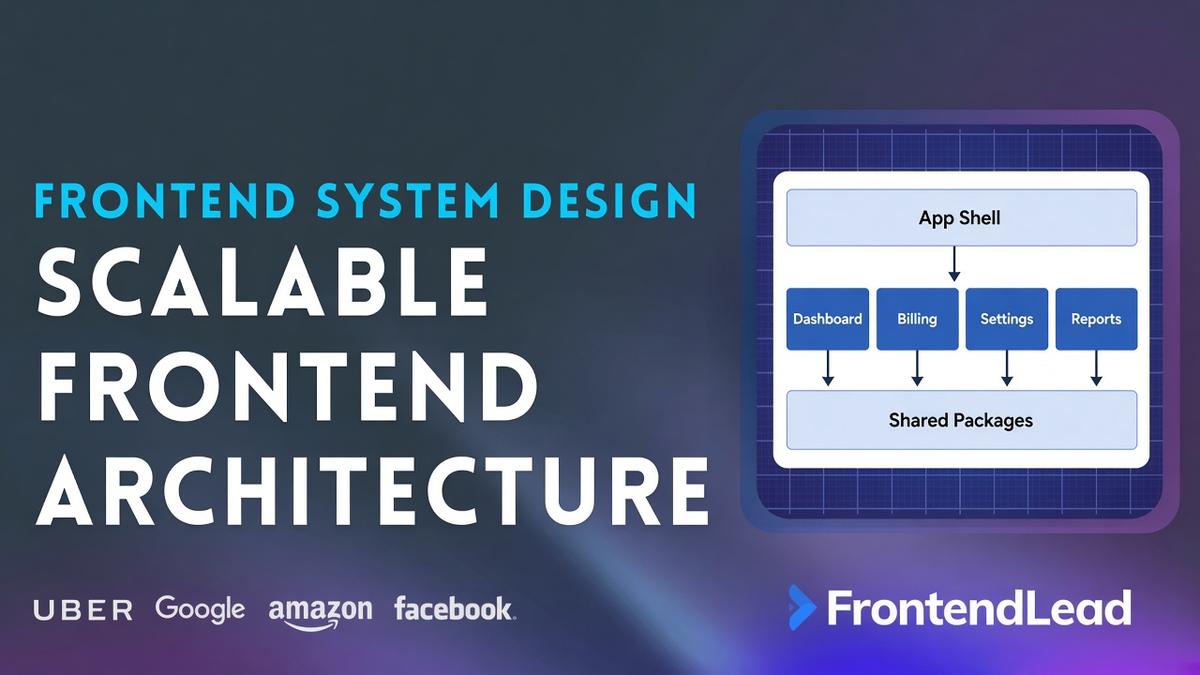
The architecture is a set of layers. Each layer may only depend on the layers below it. That one rule does most of the work of keeping the app maintainable.
| Layer | What Lives Here | Owned By | Can Import |
|---|---|---|---|
| App Shell | Router, auth/session, layout, navigation, error boundaries | Platform team | Feature modules (lazily), shared packages |
| Feature Modules | Dashboard, Billing, Settings, Reports: screens, View Models, feature state | Product teams | Shared packages only (never another feature) |
| Shared Packages | Design system, API client, state/cache helpers, utils, i18n | Platform team (with contributions) | Other shared packages |
| Platform | Build, CI, feature flags, monitoring | Platform team | Not imported by app code; it wraps it |
Feature modules talk to the backend only through the shared API Client, usually via a BFF (Backend for Frontend) or API gateway. The built bundles and assets are served from a CDN.
App Shell
The shell is the part every user loads first. It is intentionally small:
- Router: maps routes to feature modules and lazy-loads each one with
React.lazy() - Auth / Session: handles login state, token refresh, and permissions, and exposes them through context
- Layout + Navigation: header, sidebar, and the page frame every feature renders into
- Error boundaries: each feature route is wrapped in its own error boundary, so if Billing crashes, the user sees an error panel in Billing while navigation and other areas keep working
const Billing = lazy(() => import("@app/feature-billing"));
const Reports = lazy(() => import("@app/feature-reports"));

export function AppRoutes() {
  return (
    <Routes>
      <Route
        path="/billing/*"
        element={
          <FeatureBoundary name="billing">
            <Suspense fallback={<PageSkeleton />}>
              <Billing />
            </Suspense>
          </FeatureBoundary>
        }
      />
      <Route path="/reports/*" element={/* same pattern */ null} />
    </Routes>
  );
}
Feature Modules
Each feature is a self-contained package with a clear public entry point. Inside, it follows the same MVVM pattern from the rest of this course: Views are presentational, the View Model holds the business logic, and the data comes through the shared API client.
The folder structure for a feature looks like:
packages/feature-billing/
  src/
    index.ts              // public entry: the only file other code may import
    routes.tsx            // the feature's own sub-routes
    views/
      InvoiceListView.tsx
      InvoiceDetailView.tsx
    view-models/
      useInvoicesViewModel.ts
    components/           // feature-specific UI built from the design system
    api/
      invoices.ts         // typed calls through the shared API client
  package.json
The most important rule: features never import from each other. If Billing and Reports both need the same thing, it moves down into a shared package. If they need to react to each other (for example, “invoice paid” should refresh a report), they communicate through the URL, shared server data, or a small typed event bus in the shell, not direct imports.
Shared Packages
Design System
A shared component library (buttons, inputs, modals, tables, toasts) built on design tokens (colors, spacing, typography, radius). Tokens let you change the brand or add dark mode in one place. Components are accessible by default, so teams get keyboard support and ARIA right without thinking about it. Document them in Storybook so engineers and designers share the same reference.
API Client
One typed client that every feature uses. It handles the base URL, auth headers, token refresh, retries with backoff for safe requests, timeouts, and consistent error objects. Types are generated from the backend’s OpenAPI (or GraphQL) schema, so when an API changes, TypeScript tells every affected team at build time instead of users finding out at runtime.
State / Cache
Shared helpers for server state (for example, a configured React Query client with sensible defaults for caching and refetching). Each feature owns its own query keys and local state.
Utils + i18n
Date, number, and currency formatting through Intl, translation helpers, and small pure utilities. Everything here is framework-agnostic and easy to unit test.
State Management at Scale
The biggest state mistake in large apps is one giant global store that every team writes to. Instead, split state by who owns it and how long it lives:
| State Type | Example | Where It Lives |
|---|---|---|
| Server state | Invoices, reports, users | Server cache (React Query / SWR), keyed per feature |
| Global app state | Session, permissions, theme, locale | App shell context |
| Feature state | Selected invoice, wizard step | Inside the feature (useState, useReducer, or a feature-scoped store) |
| URL state | Filters, sort, page, active tab | Query params |
| Form state | Unsaved input | The form component |
Most of what people put in Redux is actually server state. Once you move that into a server cache, the truly global state that’s left is small enough for React Context.
Monorepo vs Polyrepo
| Approach | Pros | Cons |
|---|---|---|
| Monorepo (Nx, Turborepo, pnpm workspaces) | One place for all code, atomic changes across packages, shared tooling, easy refactors | Needs tooling to keep CI fast, ownership must be explicit |
| Polyrepo (one repo per team or package) | Strong isolation, independent tooling per team | Version drift, painful cross-repo changes, duplicated tooling |
For 10 teams on the same framework, a monorepo is usually the better choice. Tools like Nx and Turborepo understand the dependency graph between packages, so CI only builds and tests what a PR actually affects (and caches the rest). A CODEOWNERS file maps each package to its team, so the right people review every change.
Modular Monolith vs Micro-Frontends
This is the decision interviewers most want to hear you reason about.
- Modular monolith: all features are separate packages in one repo, built and deployed as one app. Boundaries are enforced by tooling, not by deployment.
- Micro-frontends: each feature is built and deployed separately and composed at runtime, for example with Module Federation (built into Webpack 5 and Rspack, and available for Vite through a plugin).
| Factor | Modular Monolith | Micro-Frontends |
|---|---|---|
| Independent deploys | No, one release for everyone | Yes, each team deploys on its own |
| Performance | Best: one build, shared chunks, no duplication | Risk of duplicate dependencies and extra requests |
| Consistency | Easy: everyone uses the same versions | Harder: versions of React or the design system can drift |
| Complexity | Low | High: runtime composition, shared dependency config, cross-app testing |
| Best for | Most teams, up to dozens of engineers | Large orgs where release coordination is the bottleneck |
A strong answer: start with a modular monolith with strict boundaries. Because each feature already has a single public entry point and no cross-feature imports, you can later extract the one or two areas that truly need independent deploys into micro-frontends without a rewrite. Choosing micro-frontends on day one often adds a lot of complexity to solve a problem you don’t have yet.
Enforcing Boundaries
Rules in a wiki don’t scale. Rules in CI do:
- Import rules: Nx’s
enforce-module-boundaries, ESLint’sno-restricted-imports, or dependency-cruiser fail the build if a feature imports another feature or a shared package imports a feature - Public entry points: each package exposes only what’s in its
index.ts(or theexportsfield inpackage.json), so internal files can change freely - Strict TypeScript:
strictmode across every package - Shared configs: one ESLint, Prettier, and TypeScript config package so every team follows the same conventions
API Layer and Backend for Frontend (BFF)
With several backend services, a single screen might need data from three of them. Calling each service directly from the browser means more requests, more auth handling, and frontend code that knows too much about the backend’s layout.
A BFF is a thin server layer owned by the frontend teams. It aggregates and reshapes backend data into exactly what each screen needs:
// Without a BFF: the browser makes 3 calls and stitches the data together
const account = await api.get("/accounts/123");
const invoices = await api.get("/billing/invoices?accountId=123");
const usage = await api.get("/metering/usage?accountId=123");

// With a BFF: one call, shaped for the screen
// GET /bff/billing/overview?accountId=123
export type BillingOverviewResponse = {
  accountName: string;
  plan: string;
  balance: { amount: number; currency: string };   // amount in minor units
  recentInvoices: { id: string; date: string; total: number; status: "paid" | "open" | "overdue" }[];
  usageThisMonth: { metric: string; used: number; limit: number }[];
};

// --- Error Response (all endpoints) ---
export type ErrorResponse = {
  error: string;
  message: string;
  status: number;
  requestId: string;   // lets support trace the error across services
};
Whether you use a BFF, a GraphQL gateway, or direct REST calls, the important part is that every feature uses the same shared API client with generated types, so error handling, retries, and auth work the same way everywhere.
Performance at Scale
Performance doesn’t usually die from one big mistake. It dies from 60 engineers each adding “just one more” dependency. So the goal is to make the fast path the default, and to catch regressions automatically.
Keep the Initial Load Small
- Route-based code splitting: users only download the shell and the feature they open
- Prefetch on intent: prefetch a feature’s bundle when the user hovers its nav link
- Shared vendor chunks: React and the design system load once and are cached long term
- Tree-shakeable packages: shared packages ship ES modules with
"sideEffects": falseso unused exports are dropped
Performance Budgets in CI
- Bundle size: tools like
size-limitor bundler stats fail a PR that grows a route’s bundle past its budget - Lighthouse CI: run on key pages to catch LCP and CLS regressions before release
- Dependency review: new dependencies need a reason (size, maintenance, license)
Measure Real Users
Lab tests don’t catch everything. Collect Core Web Vitals (LCP, INP, CLS) from real users with the web-vitals library, tagged by route, so each team can see how its own pages perform.
Quality, Releases, and Observability
Testing Strategy
| Test Type | What It Covers | Tools |
|---|---|---|
| Unit | View Models, utils, reducers | Vitest, Jest |
| Component / Integration | A view with mocked API responses | React Testing Library, MSW |
| Visual regression | Design system components | Storybook + Chromatic or Playwright screenshots |
| End-to-end | A few critical journeys (login, pay an invoice) | Playwright, Cypress |
Keep end-to-end tests few and focused. They’re slow and flaky at scale, so most confidence should come from fast unit and integration tests.
Releasing Safely
- Trunk-based development: small PRs merged to main often, instead of long-lived branches that conflict
- Feature flags: unfinished work ships hidden behind a flag, and finished work rolls out to 1%, 10%, then 100% of users
- Preview deployments: every PR gets its own URL for design and product review
- Fast rollback: versioned, immutable bundles on the CDN, so rolling back is just pointing back to the previous version
Observability
- Error tracking: a tool like Sentry with source maps, tagged with the feature and owning team, so alerts go to the right people
- Request IDs: the API client attaches a request ID to every call, so frontend errors can be traced through backend logs
- Dashboards: error rate, Web Vitals, and API latency per feature
Accessibility and Security
Accessibility (a11y)
- Accessible by default: the design system handles focus management, keyboard support, and ARIA for complex components (modals, menus, comboboxes, tables)
- Automated checks:
eslint-plugin-jsx-a11yin linting and axe-core in component and end-to-end tests - Route changes: on client-side navigation, move focus to the new page’s heading and update the document title, so screen reader users know the page changed
- Color contrast: enforced at the design token level, so every team inherits WCAG AA contrast
Security
- XSS: React escapes output by default. Ban
dangerouslySetInnerHTMLwith a lint rule (or require a sanitizer like DOMPurify), and add a Content Security Policy (CSP) - Auth: session tokens in httpOnly, Secure, SameSite cookies, handled once in the shell and the API client
- Permissions: the UI hides what a user can’t do, but the backend always enforces it
- Supply chain: lockfiles, automated dependency updates, and vulnerability scanning in CI. With 60 engineers adding packages, this matters a lot.
- Secrets: nothing secret is ever bundled into frontend code. Anything in the bundle is public.
Conclusion: Building a Scalable Frontend Architecture
A scalable frontend architecture is less about picking the perfect framework and more about clear boundaries. Keep the app shell small, give every team a self-contained feature module that only depends on shared packages, put shared UI and API logic into well-owned packages, and enforce all of it in CI. Start with a modular monolith in a monorepo, split by route, guard performance with budgets, and release behind feature flags. Then, if one area truly needs independent deploys, the boundaries you built make moving it to a micro-frontend a small step instead of a rewrite.