
Design a Sprint Board – Frontend System Design
Our aim is to design a digital Sprint Board similar to Jira, tailored to enhance team collaboration and streamline workflow management.
This digital Sprint Board will be an interactive web application where team members can manage tasks, represented as tickets, across various stages of development. The design focuses on simplicity, usability, and efficiency, ensuring that teams can focus on delivering value without the tool becoming an impediment.
Full Diagram can be found below:

Requirements
Functional Requirements:
- Managing Existing Sprint: Users must be able to view and interact with the current sprint, with the ability to update the status of tickets as they move through stages.
- Create New Tickets: The application allows users to add new tickets to the sprint board, including the description, assignment, and priority of the task.
- Reorder Tickets by Columns: Tickets can be dynamically reordered within columns, reflecting priority changes or task progression. Each ticket is limited to one assignee at any given time to ensure clear responsibility.
- Create New Columns: Teams can customize their workflow by adding new columns, enabling them to represent unique stages in their development process.
Non-functional Requirements:
- Client-Side Rendering (CSR) vs. Server-Side Rendering (SSR): The design should account for the most suitable rendering approach, striking a balance between performance and SEO needs.
- Responsive Design: The board should be accessible on various devices, prioritizing a web-first design approach.
- Illusion of Real-Time: While not strictly real-time, the application should provide users with the illusion of real-time updates, ensuring a smooth and responsive experience.
- Shimmer Loaders: To enhance perceived performance, shimmer loaders will be used to indicate loading states in a graceful manner.
- Accessibility (A11y) Friendly: The design must be inclusive, adhering to accessibility standards to support users with disabilities.
- Performance: The application should be optimized for speed, minimizing load times and ensuring quick interaction responses.
- Internationalization: The application should be designed to support multiple languages and regions.
- Observability/Tracking: Incorporate analytics and monitoring to track user interactions and application performance.
Edge Cases:
- New Ticket Creation: The system must handle the creation of new tickets without hiccups.
- Infinite Scrolling: Implement infinite scrolling using the Intersection Observer API to load tickets as needed without overwhelming the browser.
- Drag and Drop in Real-Time: Ensure a seamless, real-time experience when dragging and dropping tickets, even on slower connections.
In the following sections, we will delve into the system design, addressing these requirements and ensuring a robust solution that caters to the needs of agile development teams.
High-Level Architecture
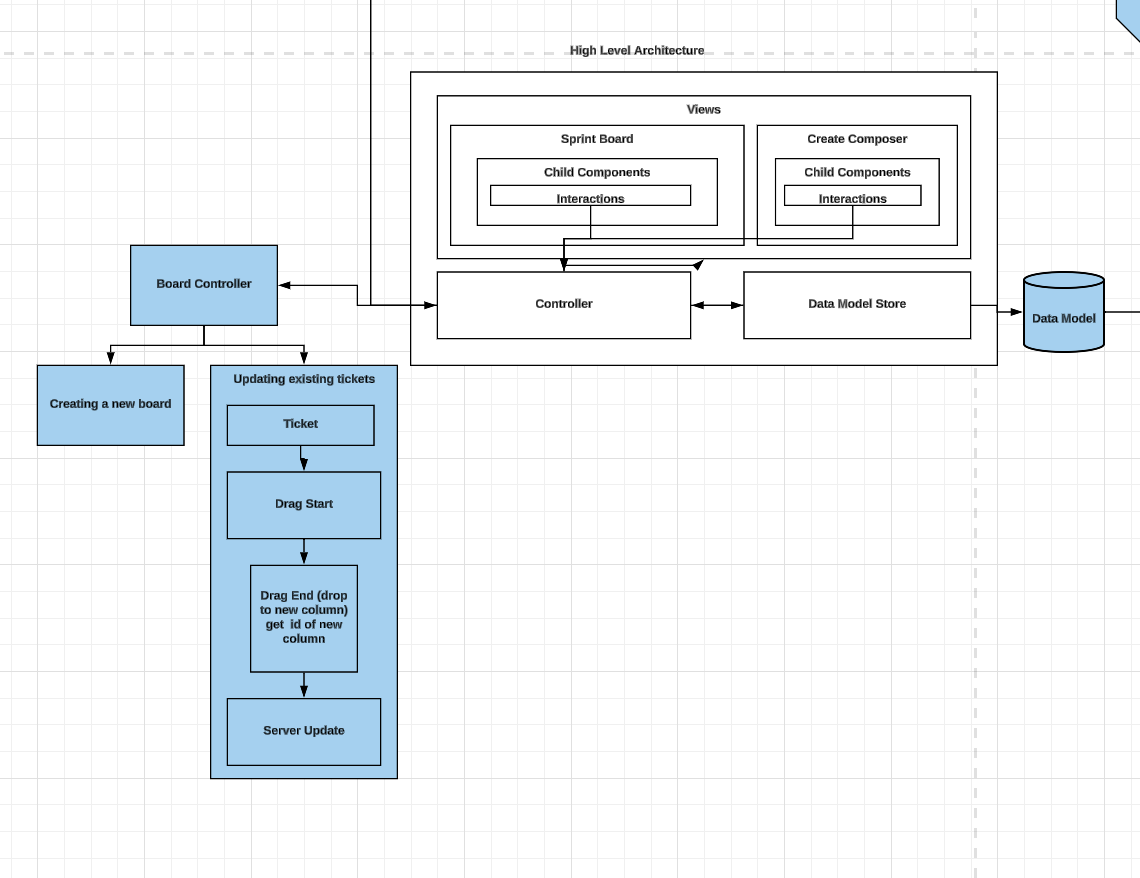
Examining the high-level architecture provided, we can structure our discussion around the key components and their interactions within the context of a Sprint Board application. Here’s a breakdown of the architecture:
Views:
- Sprint Board View: This is the central interface where the sprint board is displayed. It consists of child components that represent different columns (e.g., Todo, In Progress, Done) and tickets within those columns.
- Create Composer View: This interface is used for creating new tickets. It includes child components for input forms, assignment selectors, and priority settings.
Both these views will interact with the Board Controller, which acts as an intermediary between the views and the data model store.
Board Controller:
The Board Controller is responsible for orchestrating the creation of new boards and updating existing tickets. It communicates with the views to reflect the changes in the UI and interacts with the Data Model Store to fetch and update data.
Creating a New Board:
This process begins at the interface but is coordinated by the Board Controller, which initializes a new board structure in the Data Model Store.
Updating Existing Tickets:
- Ticket Interaction: This feature involves drag-and-drop functionality for moving tickets between columns.
- Drag Start: The process begins when a user initiates a drag action on a ticket.
- Drag End (Drop): It concludes when the ticket is dropped into a new column, at which point the id of the new column is determined.
- Server Update: Once the drop action is completed, the Board Controller sends a request to update the server with the new ticket location.
Data Model Store:
This component stores the application’s state, including details of all boards, columns, and tickets. It ensures that the UI is in sync with the backend data model.
Data Model:
The data model represents the backend storage structure, which could be a database or a cloud-based data service. It stores the persistent data of tickets, columns, board configurations, and other related information.
Controller Interactions:
The controller manages interactions between the UI and the Data Model Store. This includes processing user actions, such as creating new tickets, moving tickets between columns, and saving these changes back to the Data Model.
Considerations for Scalability and Maintainability:
- Componentization: Ensure that components in the views are reusable and encapsulated.
- State Management: Use Redux or Context API to manage the application state for predictable state management.
- Data Flow: Adopt a unidirectional data flow to ensure that the state changes are predictable and debuggable.
- API Layer: Implement a service or API layer for all server interactions to decouple the frontend from the backend, making it easier to manage changes on either side.
- Optimistic Updates: Apply optimistic UI updates to make the application feel faster. For instance, when a ticket is moved, the UI should immediately reflect this change before the server confirms the update.
- Error Handling: Incorporate robust error handling to manage failures in network requests or server updates.
Incorporating the elements of the image and the noted use cases, let’s discuss how new ticket creation and dragging will work in our sprint board application.

New Ticket Creation
When a user decides to create a new ticket, they will interact with the “Create new ticket modal” component, which consists of the following fields:
- Title: A short, descriptive title for the new ticket.
- Description: A detailed explanation of the task or issue.
- Additional Fields: Other relevant fields such as assignee, labels, priority, etc., which are represented by ellipsis (…) in the modal.
- Create Button: To submit the new ticket information.
Additional options, such as whether to add the ticket to the current sprint, can also be provided.
Upon clicking the “Create” button, the new ticket will be posted to the sprint board. The image outlines a use case where a new ticket, upon creation, should be the last item in the “In Progress” section. However, the board could provide the flexibility to add it to different columns based on the team’s workflow.
Dragging and Dropping Tickets
The sprint board will also have draggable tickets that can be moved between columns (“Todo”, “In Progress”, and “Done”) to reflect their current status. Dragging is initiated by the user starting a drag event, typically by clicking and holding a ticket.
Here’s how the process works according to the use cases described:
- Initiating Drag: The ticket becomes draggable when the The
draggable=trueproperty is set, and theondragstartevent handler is initialized. - While dragging, Visual cues such as a change in ticket style or a placeholder in the target column help indicate the action in progress.
- Dropping the Ticket: The the
ondropevent handler in the target column receives the ticket. The ticket’s new position is the end of the list in the new column as per the specified use cases. - Server Update: An API call is made to update the ticket’s status and position in the database. This operation can be designed to occur optimistically, updating the UI before receiving confirmation from the server to make the experience feel real-time.
Implementation Details:
- Consistent Vertical Positioning: To maintain ticket positioning within columns, a sorting identifier or index must be stored and updated for each ticket. This ensures that the order is preserved and respected across different sessions and user interactions.
- Ticket Movement Logic: The logic for moving tickets must ensure that the removal from one column and the addition to another are atomic operations. This could mean that the backend or frontend state management temporarily locks the ticket during this operation, preventing other operations from conflicting.
- API Call on Drag End: When a ticket is dropped into a new column, an API call is triggered to update the ticket’s metadata in the database, specifically its ‘status’ field and any other relevant ordering fields.
Accessibility and User Experience
- Keyboard Navigation: Ensure that tickets can also be moved using keyboard navigation to support users who cannot use a mouse or prefer keyboard shortcuts.
- Screen Reader Support: Descriptive ARIA roles and properties should be used to ensure that screen readers accurately convey the drag-and-drop process to visually impaired users.
- Feedback: Provide immediate visual or auditory feedback when a ticket is picked up, moved, or dropped, enhancing the overall user experience.
By addressing these considerations, the sprint board will become an intuitive and effective tool for managing the development process within an Agile framework.
API Design for Sprint Board Application
Pulling the Current Board
To retrieve the current board, a GET request is made. The board’s data, including columns and tickets, is returned in a structured format.
  const getBoard = async (boardId, limit, page) => {
    try {
      const response = await fetch(`/api/board/${boardId}?limit=${limit}&page=${page}`, {
        method: 'GET',
        headers: {
          'Authorization': `Bearer ${your_jwt_token}`,
          'Content-Type': 'application/json'
        }
      });
      const boardData = await response.json();
      return boardData;
    } catch (error) {
      console.error('Error fetching board:', error);
    }
  };
Creating New Tickets
To create a new ticket, a POST request is made with the ticket details in the request body.
  const createTicket = async (title, points, boardId) => {
    try {
      const response = await fetch('/api/ticket', {
        method: 'POST',
        headers: {
          'Authorization': `Bearer ${your_jwt_token}`,
          'Content-Type': 'application/json'
        },
        body: JSON.stringify({ title, points, boardId })
      });
      if (!response.ok) throw new Error('Ticket creation failed');
      return await response.json();
    } catch (error) {
      console.error('Error creating ticket:', error);
    }
  };
Moving Existing Tickets
To move an existing ticket, a POST request is made to transition the ticket from one column to another.
  const moveTicket = async (boardId, ticketId, targetColumnId) => {
    try {
      const response = await fetch('/api/ticket/move', {
        method: 'POST',
        headers: {
          'Authorization': `Bearer ${your_jwt_token}`,
          'Content-Type': 'application/json'
        },
        body: JSON.stringify({ boardId, ticketId, targetColumnId })
      });
      if (!response.ok) throw new Error('Ticket move failed');
      return await response.json();
    } catch (error) {
      console.error('Error moving ticket:', error);
    }
  };
Creating New Column
To add a new column to the board, a POST request is made with the column name and associated board ID.
  const createColumn = async (boardId, columnName) => {
    try {
      const response = await fetch('/api/column', {
        method: 'POST',
        headers: {
          'Authorization': `Bearer ${your_jwt_token}`,
          'Content-Type': 'application/json'
        },
        body: JSON.stringify({ boardId, name: columnName })
      });
      if (!response.ok) throw new Error('Column creation failed');
      return await response.json();
    } catch (error) {
      console.error('Error creating column:', error);
    }
  };
Communication Protocols: Choosing GraphQL for Our Sprint Board Application
Overview of Communication Protocols
In the development of web applications, choosing the proper communication protocol is crucial for ensuring efficient data exchange between the client and server. Various protocols offer different benefits and come with their own sets of trade-offs.
Polling, Long Polling, and REST
Traditional methods, such as polling and long polling, involve the client sending repeated requests to the server to check for updates. While these methods are widely supported and simple to implement, they are not the most efficient. The constant stream of requests can lead to slower performance due to the overhead of HTTP requests and latency in responses.
WebSockets
WebSockets provide a persistent, bidirectional communication channel, which allows for real-time data transfer. This method is faster than polling because it eliminates the need for repeated requests. However, it can be more expensive due to the persistent connections and may face challenges with firewalls and load balancers, especially when not using HTTP/2.
GraphQL
GraphQL is a query language that enables clients to request exactly the data they need, making it highly efficient. It’s type-friendly and works well with HTTP/2, bringing the benefits of modern transport protocols, such as efficient use of headers and multiplexing. While it may lead to pulling all connected nodes, potentially increasing latency if not managed correctly, it allows for precise and optimized data retrieval.
Why GraphQL for Our Application
For our Sprint Board Application, GraphQL is the protocol of choice due to its flexibility and efficiency. It enables us to:
- Fetch specific data related to board columns, tickets, and sprints with a single request.
- Minimize over-fetching and under-fetching of data, which is common in REST.
- Combine multiple operations into a single HTTP request to reduce network overhead.
- Effortlessly evolve the API without versioning, benefiting from a strong type system to build reliable client-side applications.
The ability to pull precisely the data we need, when we need it, without the extra overhead, makes GraphQL the ideal candidate for our web application, where performance, scalability, and real-time updates are key.
Optimization Strategies for the Sprint Board Application

Network Optimizations
- Images: Pull specific image sizes based on the viewport using web-compressed formats like WebP, when available; otherwise, use PNG.
- Compression: Utilize GZIP or Brotli for text compression to minimize the payload size sent over the network.
Rendering Optimizations
- Paginating Tickets: Implement infinite scrolling with the Intersection Observer API to load tickets as they enter the viewport, reducing initial load times.
- Virtualization: Virtualize the rendering of tickets to replace nodes in the DOM rather than re-creating them, which is beneficial for performance when dealing with long lists.
- Hybrid Rendering: Utilize a combination of Server-Side Rendering (SSR) for the initial load and Client-Side Rendering (CSR) for dynamic interactions, capitalizing on the strengths of both rendering methods.
JavaScript Optimizations
- Webpack: Utilize Webpack for polyfills and compression to ensure compatibility and efficiency.
- Dynamic Imports: Import only what you need and use lazy loading for non-critical features such as modals.
- Code Splitting: Implement bundle splitting to separate critical resources and defer non-critical ones, which can reduce the initial load time.
- CSS Optimization: Inline CSS in JavaScript for specific components to avoid excess, unused styles loading.
- Testing: Implement unit tests to cover all functionalities, ensuring that each component works correctly.
Build Outputs
- Vendor Splitting: Separate vendor libraries from the main code to cache them independently, as they change less frequently.
- Board-specific Code: Keep board-related code separate to load only when the board is being used.
Security and Accessibility in Sprint Board Application

Security Considerations
Security is paramount in any web application, as it protects sensitive data and maintains user trust. In our Sprint Board application, we implement several security measures:
- Authentication: Utilize secure authentication methods, such as OAuth or JSON Web Tokens (JWT), to manage user sessions.
- Data Validation: Rigorously validate all data on the server side to prevent XSS and other injection attacks. Never trust the client for authorization.
- API Security: Protect APIs with rate limiting and access controls to prevent abuse.
- HTTPS: Employ HTTPS to encrypt data in transit and prevent man-in-the-middle attacks.
- Content Security Policy (CSP): Define a CSP to mitigate cross-site scripting (XSS) and data injection risks.
- Regular Audits: Conduct regular security audits and update dependencies to patch known vulnerabilities.
Accessibility Considerations
Ensuring that our application is accessible to all users, including those with disabilities, is not just a legal mandate but also a moral obligation. To this end, we integrate the following accessibility practices:
- Semantic HTML: Use semantic HTML tags to provide meaningful structure and help screen readers interpret the content.
- Aria Attributes: Apply ARIA (Accessible Rich Internet Applications) attributes to enhance accessibility, especially in dynamic content and complex user interfaces.
- Keyboard Navigation: Ensure all interactive elements are operable with keyboard-only controls.
- Maintain high contrast ratios for text and interactive elements to support users with visual impairments.
- Alt Text for Images: Provide descriptive alt text for images, so screen readers can convey the information they contain.
- Responsive Design: Ensure the application is usable on a range of devices and screen sizes.
- Error Handling: Design clear error messages and provide suggestions for resolution to assist users when they encounter input errors.
- Testing: Perform accessibility testing with real users, including those who rely on assistive technologies.