
What is the event loop? What is the difference between call stack and task queue?
Understanding the JavaScript Event Loop
The event loop is a critical concept that every aspiring web developer must grasp to effectively harness the full potential of JavaScript in creating responsive and non-blocking user interfaces. Its role in managing asynchronous operations and ensuring that web applications remain responsive, even under heavy load, cannot be overstated. By unraveling the workings of the event loop, developers can write more efficient code, optimize application performance, and prepare for challenging frontend interviews.
Understanding the event loop involves exploring several interconnected JavaScript concepts, including the call stack, callback queue, and microtasks. This article endeavors to provide a comprehensive overview of these components, how they interact within the event loop, and why this knowledge is indispensable for modern web development. Through this exploration, the mysteries of the event loop will be revealed, empowering developers with the knowledge to leverage JavaScript’s capabilities to their fullest.
Basics of JavaScript
Before diving into the intricacies of the event loop, it is essential to lay a foundation by understanding the basic principles of JavaScript. As a high-level, interpreted programming language, JavaScript is designed to make web development a smoother, more intuitive process. Its ability to add interactivity, handle user inputs, manipulate the DOM (Document Object Model), and communicate with servers in an asynchronous manner makes it the language of choice for front-end development.
JavaScript operates on a single-threaded model, meaning it can execute only one command at a time. This might seem like a limitation, especially in an era where multitasking capabilities are highly valued. However, JavaScript overcomes this through its event-driven nature, allowing it to handle numerous tasks in the background without blocking the main thread. This is where the event loop comes into play, orchestrating the execution of code, events, and tasks in an efficient and non-blocking way.
The single-threaded nature of JavaScript, combined with its event-driven architecture, necessitates a deep understanding of how the event loop works. By mastering JavaScript fundamentals, developers can write code that optimizes the event loop’s capabilities, ensuring applications that are both fast and responsive.
What is the Event Loop in JavaScript?
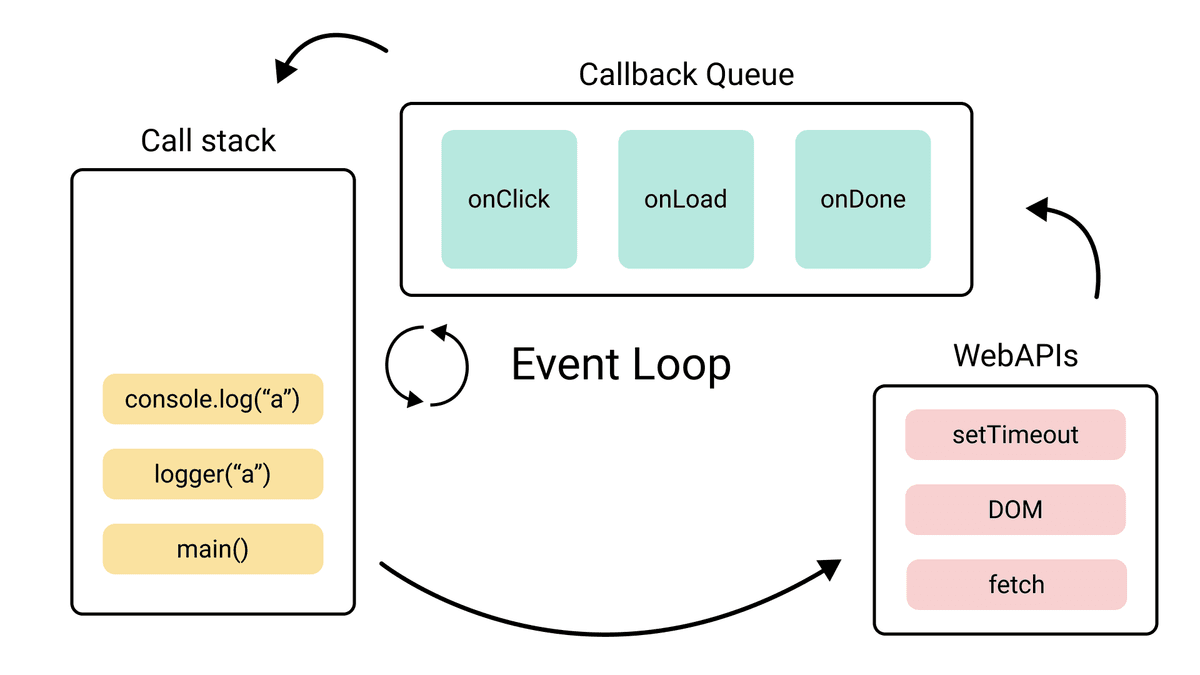
The event loop is the mechanism that enables JavaScript to perform non-blocking, asynchronous operations despite being single-threaded. It is the secret sauce that allows JavaScript to handle multiple tasks by offloading operations that take time to complete, thus keeping the application responsive. At its core, the event loop monitors the call stack and the callback queue. When the call stack is empty, the event loop moves the first event from the queue into the call stack, making sure that callbacks are executed in a timely and orderly fashion.
Understanding the event loop begins with recognizing its role in the broader context of the JavaScript runtime environment. The runtime consists of the memory heap, where objects are stored, and the call stack, where code execution is tracked. However, operations like I/O (input/output), network requests, and timers are handled differently. They are executed asynchronously and, once completed, are moved to the callback queue. The event loop continuously checks whether the call stack is empty and if there are any callbacks waiting to be executed. This process ensures that JavaScript’s single-thread can handle a multitude of tasks efficiently, making the most of its single-threaded nature.
By grasping what the event loop is and its function within the JavaScript environment, developers can better understand how JavaScript manages asynchronous operations. This knowledge is crucial for writing efficient code that optimizes the execution flow, reduces bottlenecks, and enhances the overall performance of web applications.
How Does the Event Loop Work?
The workings of the event loop can be likened to a well-orchestrated dance, where each component plays a specific role in harmony with others to keep the application running smoothly. At the heart of this process is the event loop’s continuous cycle, which ensures that asynchronous tasks are handled efficiently without blocking the main thread.
Firstly, the call stack is where the JavaScript engine tracks the execution of all synchronous operations. Functions are pushed onto the stack as they are called and popped off once they are completed. However, because JavaScript is single-threaded, long-running operations could halt the execution of other tasks. To prevent this, asynchronous callbacks are used for operations that take time, such as fetching data from a server or waiting for a timer to complete. These callbacks are not directly placed into the call stack; instead, they enter the event loop’s domain.
Once an asynchronous task is completed, its callback is moved to the callback queue, a waiting area where callbacks line up for their turn to be executed. The event loop continually monitors the call stack; when it finds the stack empty, it transfers the callback at the front of the queue to the call stack. This transfer happens only if the call stack is clear of any other tasks, ensuring that the main thread remains unblocked and the application responsive.
This cyclic operation of the event loop allows JavaScript to perform complex tasks, handle concurrency, and manage multiple asynchronous operations simultaneously. It is the backbone of JavaScript’s non-blocking behavior, enabling developers to build fast and interactive web applications that can handle high volumes of tasks without compromising user experience.
For the formal definition, see the HTML Standard’s section on event loops and MDN’s guide to the JavaScript execution model.
Understanding the JavaScript Event Loop Through a Simple Example
The Basics of the Event Loop
- Call Stack: This is where JavaScript stores function calls in a LIFO (last in, first out) order. It’s key to remember that JavaScript can only do one thing at a time since it’s single-threaded.
- Callback Queue: Functions that are asynchronous and are to be executed later (like those from
setTimeout,setInterval, or asynchronous APIs) are added here. - Event Loop: Its job is to check if the call stack is empty. If it is, and there are pending callbacks in the callback queue, the event loop pushes the first callback from the queue to the call stack.
A Simple Code Example
console.log("Start");

setTimeout(() => {
  console.log("Callback");
}, 2000);

console.log("End");
Output Explained:
- “Start” is logged first.
- The
setTimeout()callback is offloaded for 2 seconds. - “End” is logged next.
- After at least 2 seconds, and once the call stack is empty, “Callback” is logged.
Visual Diagram
| Call Stack | Callback Queue | Web APIs |
|---|---|---|
| console.log(“Start”) | setTimeout (empty) | setTimeout -> 2s (runs timer) |
| (empty) | (empty) | setTimeout -> 2s |
| console.log(“End”) | (empty) | setTimeout -> 2s (timer still running) |
| (empty) | setTimeout callback | (timer ends) setTimeout callback -> to Queue |
| console.log(“Callback”) | (empty) | (empty) |
Step-by-Step Process
- Step 1: “Start” is printed. The call stack executes
console.log("Start")and then clears it. - Step 2:
setTimeoutis set. JavaScript uses Web APIs to track the timer, allowing the call stack to run other operations. - Step 3: “End” is printed. The call stack executes
console.log("End")and then clears it. - Step 4: Once the timer completes, the callback from
setTimeoutmoves to the callback queue. - Step 5: Event loop checks if the call stack is empty. Since it is, the callback is moved from the queue to the call stack.
- Step 6: “Callback” is printed. The call stack executes the callback and clears itself again.
Importance of the Event Loop in JavaScript Applications
The significance of the event loop in JavaScript applications cannot be overstated. It is the linchpin that allows developers to build highly responsive and interactive applications despite JavaScript’s single-threaded nature. Understanding and leveraging the event loop is paramount for optimizing application performance and creating smooth user experiences.
One of the primary benefits of the event loop is its ability to handle asynchronous operations effectively. In modern web applications, operations such as API calls, data fetching, and processing user inputs are common. These operations can take varying amounts of time to complete, potentially blocking the main thread and degrading the user experience. The event loop mitigates this by managing asynchronous callbacks, ensuring that long-running tasks do not prevent the execution of other code.
Moreover, the event loop plays a crucial role in enabling real-time updates and interactions in web applications. Features such as live chat, real-time notifications, and dynamic content updates rely on the event loop to process events and updates asynchronously. This ensures that the application remains responsive and capable of handling real-time data without delays or blocking.
Lastly, mastering the event loop and its implications on application performance is indispensable for developers looking to optimize their code. By understanding how the event loop works, developers can write more efficient JavaScript code, reducing bottlenecks and improving execution times. This knowledge is also invaluable in debugging complex asynchronous code, allowing developers to identify and resolve issues related to event handling and asynchronous operations more effectively.
Common Misconceptions About the Event Loop
Despite its central role in JavaScript programming, several misconceptions about the event loop persist. These misunderstandings can lead to confusion and inefficiencies in code development. Addressing these fallacies is key to fully leveraging the event loop’s capabilities.
One prevalent misconception is that the event loop allows JavaScript to become multi-threaded. While the event loop enables asynchronous execution, JavaScript remains fundamentally single-threaded. The event loop works within this constraint, managing asynchronous operations without creating additional threads. Understanding this distinction is crucial for correctly architecting applications and avoiding potential pitfalls related to concurrency.
Another common misunderstanding relates to the timing of asynchronous callbacks. Some developers assume that placing a task in a callback queue guarantees immediate execution once the call stack is empty. However, the event loop processes tasks in a first-come, first-served manner, and the timing of execution can vary based on the queue’s state and the nature of other executing tasks. Recognizing this helps in managing expectations and planning for potential delays in asynchronous operations.
Additionally, the belief that all types of callbacks are treated equally by the event loop is a misconception. JavaScript distinguishes between different kinds of tasks, such as microtasks and macrotasks, each with its queue and priority in the event loop. Understanding these distinctions is important for optimizing performance and ensuring the desired execution order of asynchronous operations.
By dispelling these misconceptions, developers can gain a clearer understanding of the event loop’s functionality and its impact on JavaScript programming. This knowledge is instrumental in writing effective, efficient code and in troubleshooting and optimizing web applications.
Event Loop in JavaScript vs. Other Programming Languages
The concept of an event loop is not unique to JavaScript. Other programming languages and environments employ similar mechanisms to handle asynchronous operations and concurrency. However, the implementation and behavior of the event loop can vary significantly across these languages, reflecting their unique characteristics and use cases. Comparing the event loop in JavaScript with its counterparts in other languages offers valuable insights into its distinctive features and advantages.
In languages like Python and Ruby, event loops are used in conjunction with frameworks like asyncio and EventMachine, respectively. These event loops are explicitly controlled by the developer, offering a greater degree of flexibility in managing asynchronous operations. Developers can create, manage, and stop the event loop, tailoring its behavior to the application’s needs. This contrasts with JavaScript, where the event loop is an intrinsic part of the runtime environment, operating behind the scenes without direct interaction from the developer.
Furthermore, some languages, such as Java and C#, support multi-threading, allowing for concurrent execution of code. In these environments, the role of the event loop differs, focusing on managing event-driven programming patterns rather than enabling asynchronous execution in a single-threaded context. This reflects the different approaches to concurrency and asynchronous programming across languages, each with its strengths and trade-offs.
Understanding these differences is important for developers who work across multiple programming languages or are transitioning from one language to another. It highlights the unique advantages of JavaScript’s event loop, particularly its simplicity and efficiency in managing asynchronous operations within a single-threaded environment. This knowledge also aids in choosing the right language and programming model for specific projects, based on their requirements for concurrency, real-time processing, and responsiveness.
How to Use the Event Loop Effectively in Your Code
Leveraging the event loop effectively is key to writing high-performance JavaScript applications. By understanding how the event loop works and adhering to best practices, developers can ensure that their code is efficient, responsive, and scalable. Here are some strategies for using the event loop to its fullest potential.
Firstly, it’s important to minimize the amount of work done on the main thread. Heavy computations or long-running tasks can block the event loop, leading to a sluggish user experience. Developers should offload such tasks to web workers where possible, allowing them to run in parallel to the main thread without interfering with the user interface.
Secondly, developers should make judicious use of asynchronous programming patterns, such as promises and async/await. These constructs provide a cleaner, more manageable way to handle asynchronous operations, reducing the complexity of callbacks and improving code readability. By structuring asynchronous code more effectively, developers can avoid common pitfalls such as callback hell and ensure that their applications are both fast and maintainable.
Lastly, it’s crucial to understand and leverage the microtask and macrotask queues effectively. Microtasks, such as promise callbacks, are processed as soon as the call stack empties, after each macrotask and before rendering. Macrotasks, including setTimeout and setInterval callbacks, run one per event loop turn. By prioritizing tasks appropriately and understanding their impact on application performance, developers can create smoother and more responsive user experiences.
By incorporating these strategies into their development practices, developers can harness the power of the event loop to create applications that are not only performant but also scalable and maintainable. This understanding is also essential for debugging and optimizing existing code, allowing developers to identify bottlenecks and improve application responsiveness.
Tips for Optimizing JavaScript Code Using the Event Loop
Optimizing JavaScript code to make efficient use of the event loop can significantly enhance application performance and user experience. Here are several tips for developers looking to optimize their JavaScript applications with the event loop in mind.
First, it’s critical to avoid blocking the event loop with synchronous operations. Operations that take a considerable amount of time should be made asynchronous or moved to a web worker. This ensures that the main thread remains free to handle user interactions and other tasks, keeping the application responsive.
Second, when dealing with a large number of asynchronous operations, it’s beneficial to use promise.all or promise.allSettled. These methods allow multiple promises to be handled concurrently, reducing the overall time waiting for asynchronous tasks to complete. By efficiently managing concurrent operations, developers can make better use of the event loop and improve execution times.
Third, careful management of event listeners is essential. Unnecessary event listeners can lead to memory leaks and degrade performance over time. Developers should ensure that event listeners are added and removed appropriately, avoiding the accumulation of unused listeners that can clog the event loop.
By implementing these optimization strategies, developers can write JavaScript code that is not only efficient but also scalable. Leveraging the event loop effectively allows for smoother application performance, enhancing both the developer’s and the user’s experience.
Frontend Interview Questions Related to the Event Loop in JavaScript
Understanding the event loop is not only crucial for building efficient JavaScript applications but also for acing frontend developer interviews. Here are some common interview questions related to the event loop that candidates may encounter:
- Can you explain what the event loop is and how it works in JavaScript?
- How does the event loop handle asynchronous callbacks?
- What is the difference between the call stack and the callback queue?
- Can you describe the difference between microtasks and macrotasks and their priority in the event loop?
- How can web workers be used to prevent blocking the event loop?
Preparing for these questions requires a solid understanding of JavaScript fundamentals and the event loop mechanism. Candidates should be able to articulate how the event loop enables non-blocking, asynchronous programming in JavaScript and discuss strategies for optimizing code to make efficient use of the event loop.
Conclusion and Key Takeaways
The event loop is a fundamental concept in JavaScript programming, enabling the language to handle asynchronous operations and maintain application responsiveness despite its single-threaded nature. Understanding the event loop is essential for writing efficient, high-performance JavaScript code and for succeeding in frontend development roles.
Key takeaways from this exploration of the event loop include its role in managing asynchronous operations, strategies for using the event loop effectively in code, and tips for optimizing JavaScript applications to enhance performance. Additionally, familiarity with the event loop is crucial for frontend developer interviews, where a deep understanding of JavaScript internals can set candidates apart.
By demystifying the event loop, developers can better harness the power of JavaScript to build dynamic, responsive web applications. The event loop’s ability to manage complex operations and maintain smooth application performance is a testament to the elegance and capability of JavaScript as a programming language.